
A phone system that gets better every week.
62 releases and counting, each one itemized. See what changed, and where to find it in your portal.
Follow along with the Atom feedReleases per day, last 22 days to 2026-10-02
- 2026-09-11: 1 release
- 2026-09-12: 1 release
- 2026-09-13: 2 releases
- 2026-09-14: 1 release
- 2026-09-15: 1 release
- 2026-09-16: 0 releases
- 2026-09-17: 0 releases
- 2026-09-18: 0 releases
- 2026-09-19: 0 releases
- 2026-09-20: 0 releases
- 2026-09-21: 0 releases
- 2026-09-22: 1 release
- 2026-09-23: 3 releases
- 2026-09-24: 3 releases
- 2026-09-25: 4 releases
- 2026-09-26: 4 releases
- 2026-09-27: 9 releases
- 2026-09-28: 11 releases
- 2026-09-29: 4 releases
- 2026-09-30: 3 releases
- 2026-10-01: 11 releases
- 2026-10-02: 3 releases
One bar for every day. The taller the bar, the more releases that day.
Three to read first.
Straight from the running product. Each one links to its full release notes.
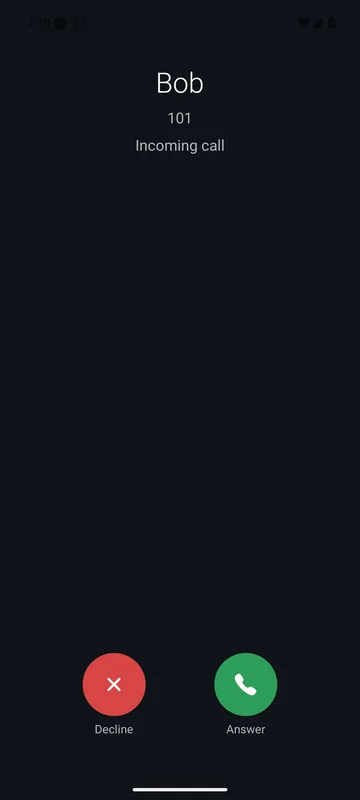
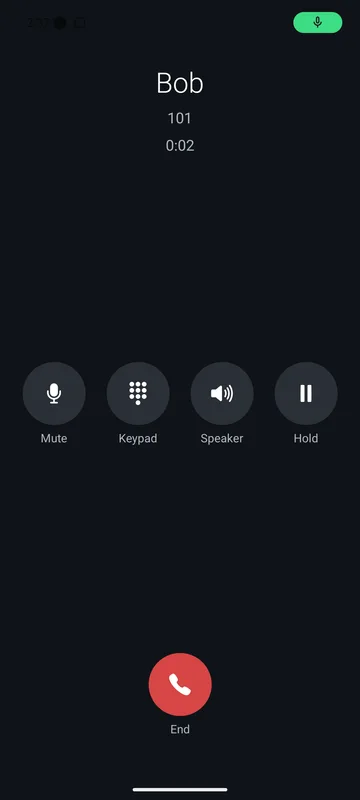
Your Android phone rings with the app closed.
Answer or decline from the call notification, with two-way audio over cellular. Tested on a real Android phone on cellular, 2026-10-01.
Wakes the app, rings like a call
A push message wakes the 4voice app and the call rings with Answer and Decline.
Audio on cellular and Wi-Fi
Call audio goes through our own relay server, so it works on cellular and on ordinary Wi-Fi.
Answered elsewhere first?
The phone is told to stop ringing the moment a desk phone or the browser picks up.
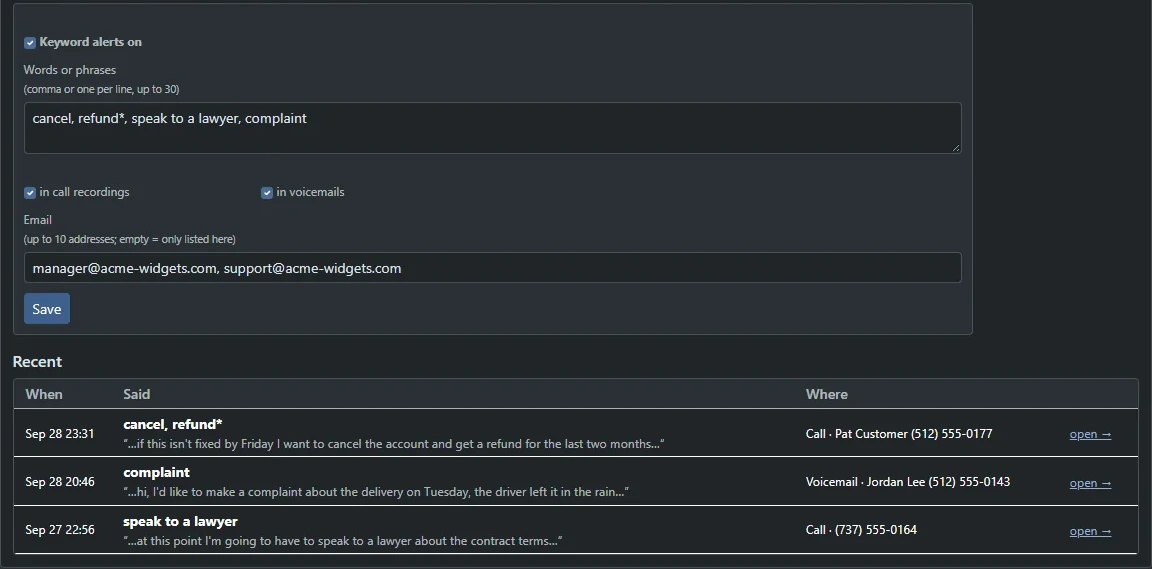
Hear about it when a watched word comes up.
Add words like cancel, refund or speak to a lawyer. When a call recording or voicemail transcript mentions one, your list gets an email and your webhook fires.
- Up to 30 words or phrases to watch, sent to up to 10 addresses.
- Email and webhook alerts, so your CRM or chat channel hears it too.
- Matched on our own servers. Only the alert leaves them.
A silent alarm from any extension.
Dial *999 and your own team is alerted by text and email, with an announcement over a page group. Nothing rings out loud at the desk.
Every release, dated and itemized.
Find any change in seconds: filter by area, or search a star code, a word or a feature.
- Feature
A silent panic alarm, pickup groups and scheduled call-backs
Raise the alarm from any phone with *999, pick up calls inside your own group, and have your phone ring first before it dials a customer.
- Panic button: dial *999 for a silent alarm to your own team: it texts and emails your list and announces over a page group
- Pickup groups: *8 picks up only calls ringing inside your own group
- Phone screen messages: send a short notice to chosen extensions
- Personal hold music: each extension can pick its own track from the company's
- Missed-call texts to me: a text with who called and when, for calls to your extension
- After-hours greeting: a voicemail greeting that follows your schedule
- Record a live call from the switchboard, with the recording notice played to both sides
- Scheduled call-backs: pick a number and a time and your phone rings first, then dials them
- Feature
Hide your number for one call, and set dialing limits per extension
Eight add-ons that put managers and users in control of how each extension makes and takes calls.
- Hide my number: *67 hides your caller ID for one call, *82 shows it once
- Dialing permissions: everything, North America only, or inside calls only, per extension
- Personal attendant: callers press 1 for your mobile, 2 for a colleague or 0 for reception before voicemail
- Phone offline alerts: email managers when a watched phone stays unregistered, and again when it returns
- Hotline phones: lifting the handset dials a set number, optionally the only one it can call
- Call dispositions: tag any call with an outcome code using *58*, then report by outcome
- Maximum call length: end calls at a limit from one to twenty-four hours, with a warning tone first
- Call limit per extension: from one to nine calls at once
- Feature
Support tickets from your portal and the app
Open a ticket, read the replies from 4voice staff and answer, all in the portal or the Android app.
- Open a ticket with a subject, message, urgency and up to five files
- See your tickets (managers see the whole company's), read the replies and answer
- Replies arrive as 4voice Support; internal staff notes are never shown to customers
- Available as an add-on in the portal and the Android app
- Apps
The Android app rings when it is closed
Incoming calls wake the 4voice app and ring with Answer and Decline, with two-way audio over cellular.
- A push message wakes the app, and the call rings as a call notification with Answer and Decline
- Tested on a real Android phone on cellular: it rang, answered and carried two-way audio
- Call audio from the app goes through our own relay server, so calls work on cellular and on ordinary Wi-Fi
- If the call ends or is answered elsewhere first, the phone is told to stop ringing
- Apps
Video calling in both apps, in light and dark
Tap Video on the keypad, follow your phone's light or dark setting, and see your company's add-ons right in the apps.
- Video calls: tap Video on the keypad, and incoming video calls get a Video answer button
- Camera on and off, flip cameras, picture-in-picture, and video calls start on speaker
- Light and dark follow the phone, or pin one under Account, Appearance
- Customer app: inbox, website chat, dialer, meetings, shifts, reminders, My calls and 911 location appear when your company has them
- Admin app for 4voice staff: a Phone tab with busy lamps and recent calls, and the support queue on the Support tab
- Feature
Let VIPs through do-not-disturb, and send any call to your mobile
Press *6 to move a call to your mobile, play your own messages on hold and set do-not-disturb on a timer.
- DND breakthrough: colleagues, VIPs and listed numbers still ring, or callers can press 1 for urgent
- Send a call to my mobile: *6 during a call, or To mobile in the browser phone
- On-hold messages: mix up to five announcements into your hold music
- Conference roll call: callers record their names so the room hears who joined and left
- Phone lock: *77 and a PIN lock a desk phone against outside calls
- Queue break reasons: *51 plus a code, reported by reason
- DND with a timer: *78 plus minutes, or an end time in the portal
- Personal speed dials: each person's own *0* shortcuts
- Feature
Tell calls apart by ringtone, and return the last call with *69
Eight add-ons that make every extension quieter, clearer and easier to manage.
- Distinctive ringing: eight ring tones for VIPs, company numbers, outside calls and inside calls
- Busy and temporary greetings for voicemail
- Call return: *69 reads back the last caller and one key rings them
- Selective call acceptance: only listed outside callers ring through
- Ring group log in and out with *45 and *46
- Hold reminder: your phone beeps while someone is on hold
- Recording share links: expiring links with an optional PIN and a play log
- Call waiting on or off with *70
- Feature
Ring back when a colleague is free, flag urgent voicemail, route by area code
Eight add-ons for follow-up, urgent messages and smarter routing.
- Ring back when free: press 5 when a colleague is busy, or dial *66
- Conference dial-out: call an extension or a North American number into a live room
- Urgent voicemail: callers flag a message urgent and an on-call list is alerted
- Voicemail broadcast: one message into many mailboxes
- Area-code routing: send callers from chosen states, provinces or area codes to the right place
- Repeat callers: flag a third call within an hour and list who needs a call back
- Agent state history: each agent's day as a bar by status
- Multicast paging for Yealink desk phones over the office network
- Feature
Bill by client code, record conferences and schedule bells
Billing codes, recorded conferences and timed announcements, plus a What's new page inside the portal.
- Account codes: tag outside calls with a client or project code, with a report by code
- Conference recording: always on, or start and stop from the live panel
- Voicemail forwarding: pass a message to a colleague or shared box with a note
- Scheduled bells: school bells, chimes or announcements over a page group at set times
- What's new: notes from 4voice appear inside the portal until you open them
- Feature
Scheduled quiet hours, call pull with *71 and a 20-second network test
Weekly do-not-disturb, taking a call over from another phone, and a quick check of an office connection.
- Scheduled quiet hours: weekly do-not-disturb per extension, in that person's time zone
- Call pull: *71 on another phone of your extension takes over the call
- Number-changed message: callers to an old number hear the new one and are connected on
- Network readiness test: a 20-second browser check that reports pass, warn or fail with a voice-quality score
- Maintenance notices: planned work is emailed to affected companies, shown as a banner and posted on the status page
- Two-person approval: 4voice can require a second admin for risky platform changes
- Feature
Local-number caller ID, out-of-office voicemail and caller ID reputation
Calls that look local, away messages that answer for you and a way to spot numbers that look like spam.
- Local presence dialing: outside calls show your number for the area code you are calling
- Out-of-office voicemail: an away message instead of ringing, with 0 to reach a colleague
- Line tags: calls ring as "[Sales] Caller" and the phone can announce the line
- Caller ID reputation: answer rates per outbound number and spare numbers to rotate to
- Company templates: 4voice can create a new company from a saved template in one step
- Feature
Calls always find a person: outage failover, queue overflow, personal rules
Calls reach someone when phones go offline, queues overflow to a backup, and each person sets their own rules.
- Outage failover: calls go to a failover number when an extension or a whole office has no phones registered
- Queue overflow rules: new callers go elsewhere when too many wait or the wait runs long
- IVR path analytics: each menu's key shares, hang-ups and most common paths
- Personal call rules: up to ten rules by caller, day, time and status
- Feature
Close the office in one tap, and ring groups that share the work fairly
One tap closes every number, ring groups spread calls evenly, and a receptionist answers common questions.
- Office closure override: close now or until a set time, with your closure message on every number
- Smarter ring groups: round robin, longest idle, fewest calls today or weighted
- Smart receptionist: callers ask "what are your hours?" and hear your answer
- Scheduled conference calls: invitations with a calendar file, PIN and reminders
- Answer-rate report: a printable monthly report per company
- Bulk changes: 4voice can change add-ons, prompt voice, call caps and retention across many companies, with undo
- Feature
Executive screening, number masking and your own carrier
Assistants screen for executives, two parties talk without swapping numbers, and your own SIP trunk can join the call path.
- Executive and assistant screening: outside calls to the executive ring only the assistants
- Agent call scripts: steps and questions on the screen pop, answers saved as call notes
- Text satisfaction surveys: NPS or CSAT by text after a call
- Number masking: connect two parties through a pool number
- Bring your own carrier: add your own SIP trunk after 4voice approves it, with your 4voice trunk as backup
- Privacy erasure requests: erase a person's calls, recordings, voicemail and texts by number or email, with a proof report
- Feature
Five languages, multi-site branches and an automatic fraud guard
Prompts in five languages, branches with their own settings, call records sent to your own storage and automatic fraud checks.
- Multi-language prompts: English, Spanish, French, Portuguese or German, with an IVR key to switch language
- Multi-site locations: each branch gets its own outbound number, emergency location and hours
- Agent leaderboards with badges and a TV view
- Call record export to S3-compatible storage or SFTP
- Fraud guard: each company's outside calling is checked every five minutes, and international calling can be suspended automatically
- Status page subscriptions by email, or by text where enabled
- Custom staff roles so each 4voice staff login sees only what it needs
- Taxes and fees on invoices: federal, state and local rates as their own lines
- Feature
Hotel mode, contacts sync and WhatsApp and Messenger in one inbox
Hospitality tools, your address book kept in step and social messages in the shared inbox.
- Hotel mode: check-in and check-out, outside calls blocked from vacant rooms, wake-up calls and a bill for each stay
- Contacts sync from Google Workspace or Microsoft 365, read-only
- WhatsApp and Messenger in the omnichannel inbox, using your own accounts
- My calls: a personal dashboard of calls made, received and missed
- Config history: see and put back earlier versions of extensions, menus, queues and more
- Login security: restrict sign-in to your own networks, and see every active session
- Least-cost routing and carrier failover for outside calls
- Feature
A public status page, mass notification and online booking
Show the platform's status publicly, reach everyone by call or text, and let customers book online.
- Public status page for calling, phone connections, portals, texting and video meetings
- Mass notification: one message by call, text or both, with a live report of who heard it
- Online booking page with reminders and a self-cancel link
- Call sentiment and topics from transcripts, tagged on our own servers
- Door phone: see the camera on the browser phone and open the door
- Spend limits and usage alerts with an optional hard stop
- Audit log forwarding to your own syslog or HTTPS collector
- Getting-started wizard: a six-step checklist built from your real settings
- Feature
One inbox for texts, chats and email, plus video meetings and reseller portals
Every channel in one assignable inbox, scheduled video meetings and branded portals for partners.
- Omnichannel inbox: texts, website chats and email in one assignable list
- Agent shift schedules that set status automatically, with a coverage grid
- Call transcripts: search every recorded call by what was said, now an add-on
- Video meetings with a nine-digit ID and PIN, and guest links
- 10DLC registration tracker for business texting
- Caller verification badges from the carrier's STIR/SHAKEN verdict
- Workflow automations: when a call is missed, a voicemail arrives or a keyword is said, text, post or create a task
- Reseller accounts: partners get their own branded portal for their companies
- Feature
Skills routing, QA scorecards, website live chat and single sign-on
Send calls to the right agent, grade recorded calls, chat with website visitors and sign in through your own identity provider.
- Skills-based routing: queue calls go first to agents with the skill needed
- QA scorecards: grade recorded calls against your own checklist
- Website live chat from one script tag
- Appointment reminders by call or text with confirm and cancel
- Single sign-on through your OpenID Connect provider, with SCIM user provisioning
- Dynamic number insertion for website visitors
- Softphone 911 location: the browser phone asks where you are before a 911 call
- Feature
Your CRM on every call, an outbound dialer and campaign call tracking
Connect your CRM, work call lists and see which campaign makes the phone ring.
- CRM hookup for HubSpot and Salesforce: contact on the screen pop and every call logged
- Call notes saved with the call record and shown on the next call
- Call tracking numbers per campaign, with a report
- Outbound dialer with call lists, outcomes and a recorded voicemail drop
- Call-flow editor: drag a destination onto a branch of the call-flow map
- Call quality scores and the poor calls in your portal
- Calendar status: Google or Outlook meetings set your status
- Slack and Google Chat alerts for missed calls, voicemail and queue backlogs
- Platform
Desk-phone video that connects first time, and phone passwords set for you
Yealink video connects more reliably, and every phone's web password is set by the system.
- Yealink desk-phone video negotiates more reliably
- Every phone's web password is now set by the system, never left at a factory default
- Feature
Your logo on every Yealink desk phone
Color-screen desk phones show a wallpaper sized to their screen: the 4voice logo, your own or a full-screen picture.
- The 4voice logo by default, or your own logo or a full-screen picture, per company
- Sized for each Yealink model, with a Push to phones button
- Phones keep their own provisioning address current, and you can regenerate it with a grace period
- Feature
Control the browser phone from your own software
Dial, answer, hang up, hold, mute and transfer by URL, and send call events to a web address you choose.
- Remote control by URL: dial, answer, hang up, hold, mute, transfer, redial and do-not-disturb
- Event URLs: calls, hold, mute, transfer and registration events sent out to a web address you choose
- Per-login access token, shown once, with optional allowed addresses
- Feature
Picture texting, per-minute usage billing and a one-click data export
Photos in texts, per-minute rating of outbound calls and a one-click copy of your data.
- Picture texting (MMS): photos, PDFs and contact cards, with large photos shrunk automatically
- Usage billing: a per-minute rate deck, included minutes and rounding, itemized on the invoice
- Company data export: calls, recordings, voicemail, texts, faxes, chat and settings in one ZIP
- Feature
Keyword alerts, retention rules and number ordering
Keep what you need and get told when it matters.
- Voicemail retention and legal hold alongside recording retention
- Transcript keyword alerts by email and webhook
- Number ordering: search local and toll-free numbers and build an order
- Feature
Text auto-replies, a website call-me button and boss-and-assistant lines
Auto-reply and scheduled texts, a website button that rings your phone first, and shared lines for a boss and assistants.
- Text auto-reply, reply templates and scheduled texts
- Website call-me widget: your phone rings first, then the visitor is dialed
- Boss and assistant lines: up to four assistants ring with the boss
- A time zone for each extension, including the desk phone's clock
- Feature
Text back missed calls, pick your caller ID and show your status
Missed-call text-back, a caller ID picker, holiday calendars and presence that tells colleagues when you are free.
- Missed-call text-back with an after-hours message
- Voicemail by text: a text with the caller and the first words of the message
- Caller ID picker: choose which company number your calls show
- Public holiday calendars for US and Canada on every schedule
- Presence status: available, busy, in a meeting, away or out of office, with an end time
- Feature
Park calls, speed dials, a call-flow map and business texting
Park and pick up calls, see where every number goes and text from your company numbers.
- Call park: numbered slots, a park code and lamps on desk phones
- Company speed dials with *0 and two digits
- Departments in directories, reports, the wallboard and the apps
- Call-flow map: where a call to a number goes, with the current path highlighted
- Business texting (SMS) on your own numbers, with a shared or per-extension inbox
- Feature
Typed greetings in your company's voice, VIP callers and call screening
Control what callers hear and who gets through.
- Type a greeting and hear it spoken in your company's voice, including closed and holiday messages
- Press *1 to pause a recording while a card number is read out
- VIP callers ring as VIP and jump to the front of VIP-first queues
- Call screening: callers say their name and you press 1 to accept
- Feature
Natural voices, searchable call transcripts and menus callers can talk to
Lifelike prompts, searchable recordings and speech menus, all on our own servers.
- Natural voice prompts in six English voices for every menu, announcement and confirmation
- Call recording transcripts that say who said what, searchable by the words spoken
- Speech-enabled menus: callers can say "sales" as well as press a key
- Click-to-call: your phone rings first, then dials the number
- Online invoice payments by card through a secure checkout link
- Feature
API keys and webhooks, post-call surveys, spam screening and number porting
Connect your own systems, hear how callers rate your queues and bring your numbers over.
- Company REST API with scoped API keys, and signed webhooks with automatic retries
- Post-call survey: callers rate the call from 1 to 5, shown in reports and on the wallboard
- Spam and robocall screening that labels, challenges, sends to voicemail or refuses
- Number porting requests with an online letter of authorization and a step-by-step history
- Security
Two-factor sign-in, password links and report emails
Stronger sign-in for everyone and reports delivered to your inbox.
- Two-factor sign-in with an authenticator app and ten recovery codes, which a company can require
- Forgot password? and welcome emails with one-time links
- Scheduled call-report emails and a daily missed-calls digest
- Feature
Send and receive faxes from the portal and the app
Send PDFs and pictures from your browser and receive faxes by email, with no fax machine.
- Send PDFs and pictures with an optional cover page
- Received faxes arrive in the portal and are emailed as PDF
- Busy or failed faxes retry automatically, with an audio fallback
- Give each fax number its own header, email list and users
- Feature
Decide where every call goes: forwarding, do not disturb and find me
Control it from the portal, the app or a star code, and get voicemail by email with the transcript.
- Forward all calls, when busy, when unanswered or when your phone is offline
- Do not disturb with *78 and *79, skipped by ring groups and queues
- Find me: ring your mobile with your desk phone, with press-1 to accept
- Voicemail to email with the transcript and the audio attached
- Feature
Page a group of phones, or intercom a single phone
Talk over a group of phones, or ring one phone that answers by itself.
- Page groups: dial the group number and speak over every member's phone, one way
- Intercom: *80 plus an extension for a two-way call that answers itself
- Every registered device of a member is paged, desk phone and browser phone alike
- Feature
Block unwanted callers for the company or one extension
Block by number or prefix, reject anonymous callers, and block the last caller with *61.
- Company block list and per-extension lists, by number or prefix
- Reject anonymous callers, with a busy signal or a short message
- *61 blocks the last outside caller
- Feature
Your own hold music, managed conference rooms and recorded greetings
Your own audio on hold, managed conference rooms and greetings you can record in the browser.
- Upload your own hold music, one for the company and one for each queue
- Conference rooms with participant and moderator PINs, wait for the moderator, and a live panel to mute, remove or lock
- Record or upload voicemail greetings, recorded names and IVR greetings from the portal or the app
- Feature
Call reports by hour, day, extension and number, with CSV
Totals and trends for every company, in the company's own time zone.
- Calls in, out, internal and fax, answer rate, missed, voicemails, talk time and blocked
- By hour, by day, by extension, by number and top callers
- CSV download of every counted call
- Feature
Emergency locations with staff alerts, dial by name and queue callback
Emergency locations with staff alerts, a company directory by voice, callbacks that keep your place and shared voicemail boxes.
- Emergency locations with a callback number sent on every 911 call, and an alert on every open portal when 911 or the 933 test line is dialed
- Dial by name: *411 or an IVR key
- Queue callback: press 1, hang up and keep your place in line
- Shared voicemail boxes with their own number and PIN, and who has heard each message
- Feature
A faster chat, a phonebook, a TV wallboard, hot desking, whisper and wrap-up
A faster chat client and a set of contact-center and desk-phone features.
- Redesigned chat: three panes, search that finds messages, reactions, replies, files and a lightbox
- Company phonebook shown on desk phones, on incoming calls and in the browser phone
- Queue wallboard for a TV, with a no-sign-in TV link
- Hot desking with *55 and *56
- Agent whisper and wrap-up codes after queue calls
- Feature
Every email the system sends, in one clean branded design
Voicemail, fax, 911 alerts, reports, invoices and welcome emails share one polished design.
- Branded HTML with a plain-text copy for every email
- Color-coded headers, with red for 911 alerts
- A button from each email into the portal
- Feature
4voice Support inside your chat, with announcements
A direct line to the 4voice support team inside the portal and the app.
- A pinned 4voice Support conversation in Chat, with unread badges
- Replies arrive as 4voice Support, and an automatic reply covers moments when nobody is around
- Announcements from 4voice, with an optional banner across your portal
- Feature
See who is calling, a second before the phone rings
Caller name, number and the line they dialed appear in your portal a second before the phone rings.
- Caller name, number and the line they dialed, for extensions, ring groups and queues
- Desktop notification when the portal tab is in the background
- A call only waits for the popup when somebody is actually watching
- Feature
A browser phone that looks like a desk phone, with busy lamps and call pickup
Dial pad, busy lamps, recent calls and one-key pickup, all in the browser.
- Desk-phone look with a dial pad, Call and Video buttons and in-call soft keys
- Busy lamps: green free, red busy, blinking red ringing, with a press to call or transfer
- Recent calls with All and Missed tabs and one-click call-back
- Call pickup: ** plus an extension, *8 for any ringing call, or press the ringing lamp key
- Platform
Phones keep calling through a management outage
Working phones keep registering and calling for up to 24 hours if the management platform is unreachable.
- Front-door controllers remember every company's route, encryption mode and call-rate cap for 24 hours
- Voice servers keep their last good directory and dialplan on disk for 24 hours
- Call records for calls that end during an outage are kept and re-sent when management is back
- Proven in a live test that blocked management for more than three minutes while calls kept connecting
- Platform
A live standby that takes over with one command
A live replica of the management platform takes over with one command, and the old server is fenced so it cannot split the system.
- A standby server streams a copy of the database and shares one address with the active server
- One command switches over; the old server is fenced so it cannot become a second primary
- In a test on 2026-09-25, a switchover each way took about twenty seconds with nothing lost, and test calls kept connecting
- Security
Flood and runaway-call protection, live on the front doors
A SIP guard, SIP flood protection and a per-company call-rate cap that stop floods, outsiders and looping phones.
- SIP guard: voice servers answer SIP only from our own network
- SIP flood protection on the front doors, never throttling addresses whose phones signed in recently
- Call-rate cap: a limit on new calls per minute per company, to stop a hijacked or looping phone
- Platform
Browser phone calls on any voice server
The browser phone works for companies on any voice server, and reconnects by itself when a company moves.
- The portal connects each company's browser phone to the voice server that holds its calls
- When a company moves between servers, the browser phone reconnects by itself
- Call quality of browser and trunk legs is now measured and reported
- Security
Encrypted desk phones: TLS and SRTP, switched per company
A per-company switch for encrypted signaling and audio on desk phones: Off, Offered or Required.
- Off, Offered or Required for each company
- TLS signaling with certificate and name checks, and SRTP audio, ending at the front-door controller
- Settings written for Yealink, Polycom and Grandstream phones
- Certificate expiry is checked hourly and monitored
- Security
Toll-fraud protection from day one: call caps and an international switch
Outbound call caps per company, and international and premium-rate calling off for every new company.
- A maximum number of outbound calls at once per company
- International and premium-rate calling off by default for new companies
- Refused calls hear a clear message and are never billed
- 911 and the 933 test line are never limited
- Platform
Every recording and voicemail in one list, whichever server took the call
The portal lists, plays and transcribes every call and message, whichever voice server took it.
- Recordings and voicemail from every server appear in one list
- Reading or deleting a message in the portal also updates the phone's mailbox, and the other way round
- Mailboxes follow a company when it migrates to another server
- Feature
Call queues (ACD) with nine ring strategies
Real call-center queues with escalation, announcements and reports.
- Longest idle, ring all, round robin, top down, least talk time, fewest calls, sequential, random and ring progressively
- Escalation levels with a per-queue agent order
- Agent availability: available, on break or logged out from the portal, the phone or *50, *51 and *52
- Position and estimated-wait announcements
- Service level, abandon rate, waits and talk time by queue and agent, with CSV
- Feature
Time-of-day routing: hours, holidays and a manual override
Open hours, holidays and a manual override decide where calls go.
- Weekly hours with lunch breaks and overnight ranges
- One-off and yearly holidays
- Manual override: automatic, force open or force closed
- *60 on a desk phone flips a schedule between forced closed and automatic
- Security
Portal forms and live connections locked to your own portal
Every portal form and live connection is checked to come from the portal itself.
- Same-origin checks on every portal POST and WebSocket
- Device tokens for the apps are exempt, because they carry their own credentials
- Feature
Video calls from the browser phone
Place and answer video calls from the browser phone.
- A Video button next to Call, and answer-with-video for incoming video calls
- Remote video with a self-view and a camera toggle
- Works with camera-equipped Yealink desk phones
- Platform
Dedicated voice servers, a backup front door and a phone activity log
More control over where a company runs and how its phones connect.
- Dedicated tier: reserve a voice server for one company
- Primary and backup front-door controller per company, both written into the phone configuration
- Reprovision and reboot buttons for every phone in a company
- Phone activity log of provisioning, firmware and registration events
- A time server and correct clock for every phone
- Platform
Approved firmware on a phone's first boot
Keep desk phones on an approved firmware without touching them.
- Set an approved firmware per model and a phone upgrades the first time it provisions
- Host vendor firmware images on the platform, even for older handsets
- One-click Arm for a single phone
- Platform
Move a company between voice servers without dropping calls
Live migration between voice servers, plus per-company backup and restore that never touches other companies.
- Live migration: both servers serve the company during cutover and the old one drains before finishing
- Per-company snapshots that restore in place, with an undo point
- Scheduled database backups with retention and an off-site copy
- Feature
Rich chat, chat video and a phone in your browser
Team chat with video and screen sharing, and a phone in your browser.
- Chat reactions, edit and delete, quoted replies, attachments, @mentions, read receipts and search
- One-to-one and group video with screen sharing, on a self-hosted media server
- The browser phone: real calls in any modern browser with encrypted audio
- Push alerts for chat and voicemail
- Platform
A multi-server cluster with front-door controllers and a security console
The platform grows from one server to a cluster with its own front doors and protection.
- Multiple voice servers with health-aware routing and failover
- Front doors that hide the voice servers and relay media
- Central IP ban list with a trusted-address allowlist
- HTTPS-only admin console
- Platform
ProjectPBX is running
The first working version of the platform, built around isolated companies.
- Isolated companies with their own portals, users, extensions and dialplans
- Ring groups, numbers, auto-attendant menus and SIP trunks
- Call recording, call queues, a switchboard console and supervisor tools
- Roles, billing with scheduled invoices and automated backups
No release matches that.
Try a shorter word, or clear the filters to see all of them.
Be first to know.
Every release arrives where you already look.
Subscribe once
Add the Atom feed to any feed reader. Each entry carries the date, the summary and every change in the release.
Search it all
Press Ctrl K on any page to jump to a feature, a page or a star code.Jump to a feature, a page or a star code. 247 features, one search box.
Be on the next release.
See ProjectPBX running on your own call flow, and how the newest features fit it.
- A call flow drafted for your business
- Pricing built around your team size
- Every question answered on the call