Team chat that shows who is on a call. Video with screen share in one click. Texts from the number your customers already call, faxes from the portal and voicemail you can read. Calls you record come written down, searchable by the words that were said.
Rooms, direct messages and a live phone badge next to every name. See who is on a call before you ping them, then call or video them from the conversation. It lives in the portal and the Android app, behind the login your phones already use.
Acme · Team chatLive demo
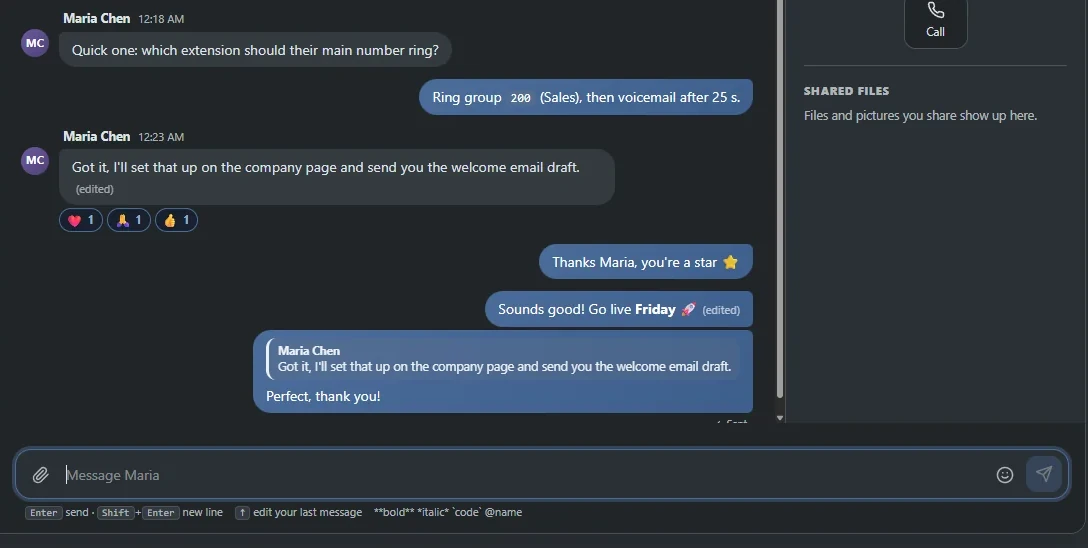
A chat window for the company Acme. Maria Chen shows an On a call badge and asks which extension the main number should ring. The reply names ring group 200. Controls: pick a conversation, type a message and press Enter to send, react to a message, press Up to edit your last message.
Ring a colleague or a whole group straight from chat. The invite rings like a call, then everyone lands in a tile grid with mic, camera and screen share. No separate meeting app, no link to paste.
One-to-one or a whole group, started from the conversation.
Share your screen and your window joins the grid as one more tile.
Video in the Android app and the browser phone. Camera-equipped Yealink desk phones work too.
Hosted by 4voice. Calls run on a media server we run ourselves.
Add-onVideo meetings: schedule with a title, a time and invitees, who are emailed the link. Guests join from a link with just their name. See video meetings
Team callLive demo
A group video call with four people shown as tiles with initials and level bars. Controls: microphone, camera, share screen, and leave or rejoin. Sharing your screen adds your shared window to the grid as one more tile.
4 people in the call
Call volume, this week
MonTueWedThuFriSatSun
Pat Manager (you), screen
PMCamera on
Pat Manager (you)Muted
MC
Maria Chen
JR
Jordan Reyes
AK
Alex Kim
You left the call.
Mic, camera and share all work. Leave, then rejoin.
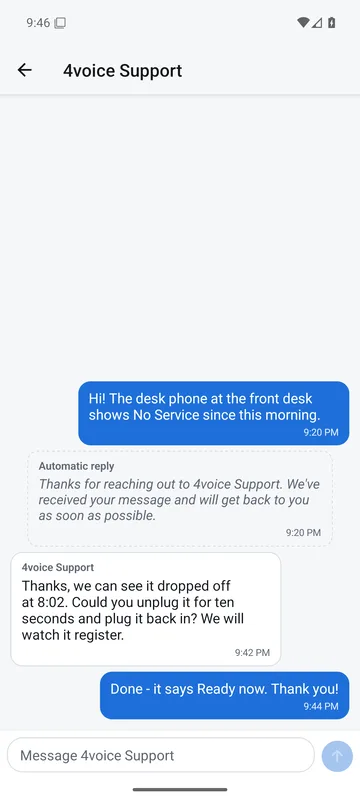
Real screen4voice Support, in the Android app.
4voice Support
Support is one message away.
Every user has a 4voice Support conversation pinned at the top of chat, in the portal and in the app. Ask a question the way you would ask a colleague. Answers come back as 4voice Support, in the same thread.
Pinned for everyone
Top of the list for every person in your company, so the right help is never a search away.
Announcements in the same thread
News from 4voice arrives with a push to the app, and an optional banner can run across every portal page.
An answer even when nobody is in
An automatic “we will get back to you” goes out so you know your message landed.
Tickets, as an add-on Add-on
Open, track and reply to tickets with 4voice from the portal or the Android app.
Business texting on your company's own numbers, with a shared or a personal inbox. Send pictures, answer from templates and schedule a text for later. Miss a call and a text-back goes out by itself.
Missed-call text-back · try itLive demo
A caller rings the company number and nobody picks up. The text-back message goes out automatically from the same number, a customer replies, and a picture is sent. Controls: choose During hours or After hours, let it ring out, customer replies, send a picture, start over.
When the call is missed
Write the message once. Your company's name is filled in for every caller, and a different message goes out when the number's schedule is closed.
(512) 555-0142from (555) 000-1000 · Acme main1
Press Let it ring out to watch the text-back go.
Missed call from (512) 555-0142 · 4:41 PM
Sorry we missed your call to Acme. We'll call you back shortly, or just reply here.
Acme main · automatic text-back · 4:41 PM
Can someone call me back about the invoice?
4:43 PM
spec-sheet.pdf
Yes! Here is ours next to the larger size, and the spec sheet.
Pat Manager · 4:44 PM
Switch to After hours and let it ring out again: a different message goes out.
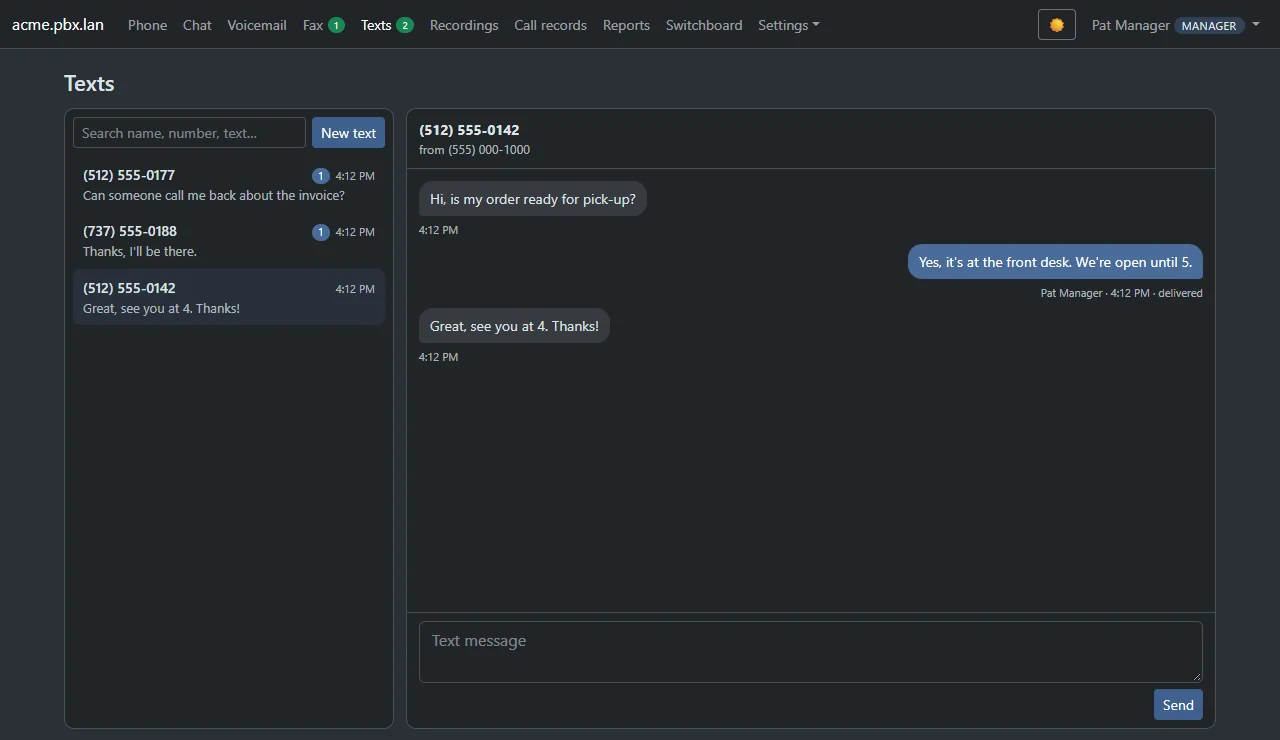
Every customer text, in one inbox.
Give each number a shared inbox for the front desk or a personal one for a single extension. Search by name, number or words, and get alerts in the browser and the app.
Shared or personal inboxBrowser and app alertsUp to 50 reply templates
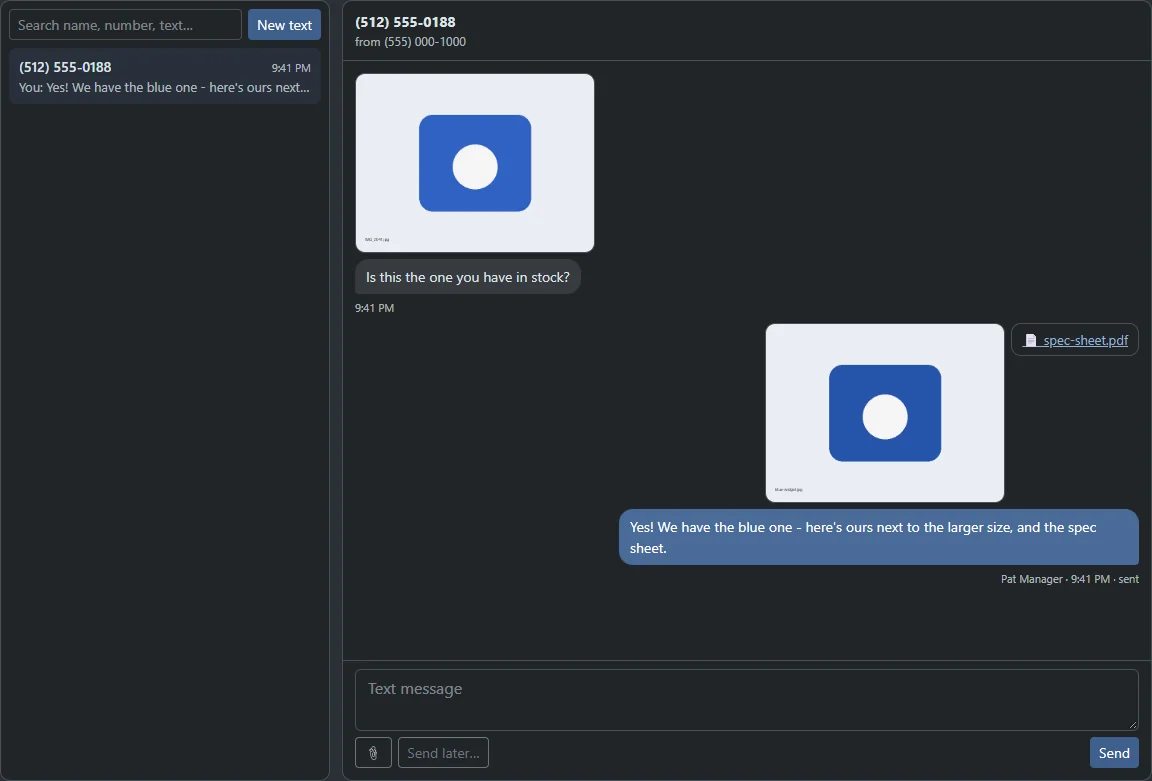
Pictures show inline in the thread, so everyone sees what the customer sees. Up to three files a text: pictures, PDFs and contact cards.
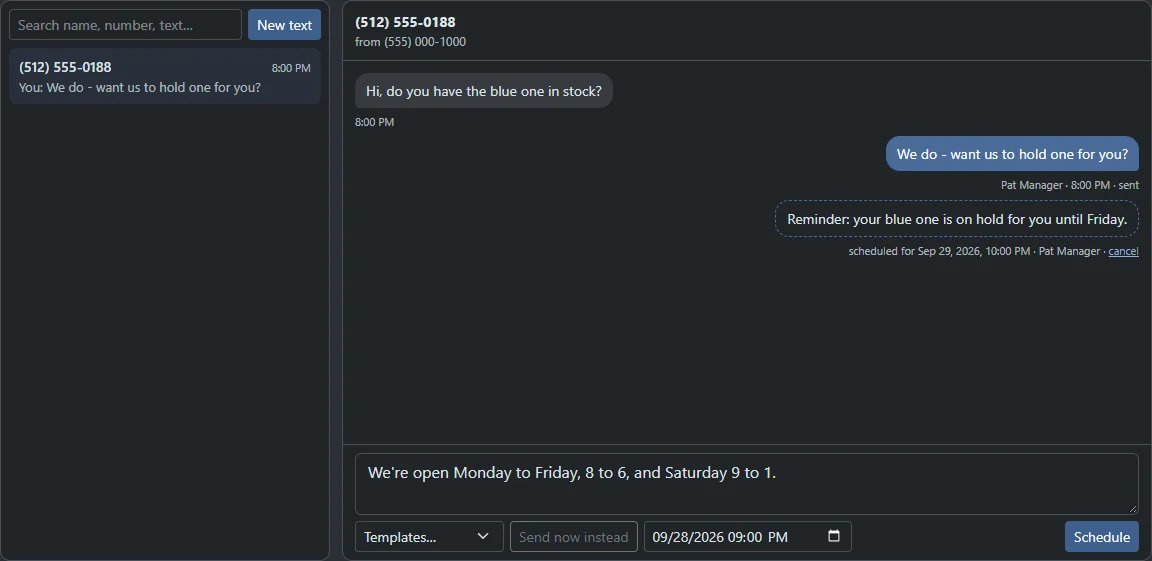
Real screen
Send it later.
Queue a reminder for tonight or up to 90 days ahead. It shows in the thread as a dashed bubble, and you can cancel it any time.
Real screen
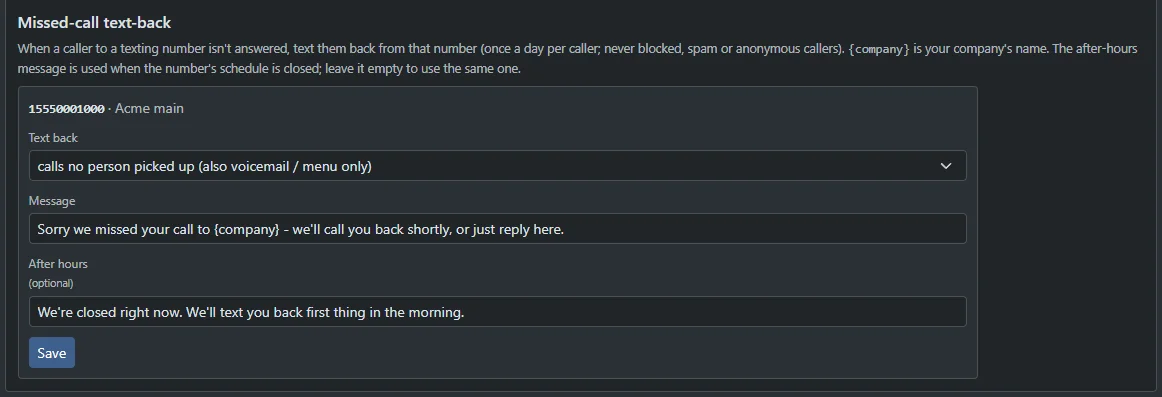
Turn a missed call into a text.
Write the message once. Your company's name is filled in for every caller, and a different message goes out when the number's schedule is closed. An auto-reply can answer incoming texts while you are closed.
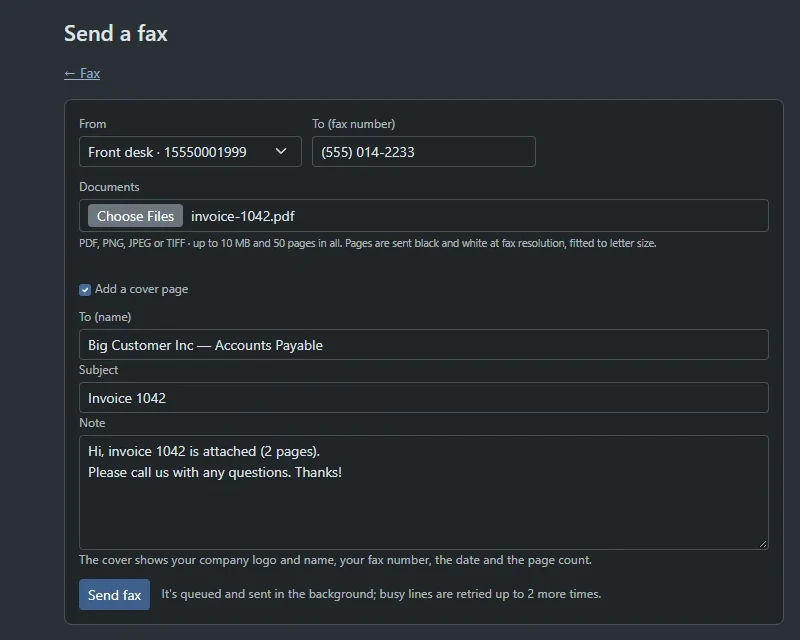
Send a fax: pick the number, attach a PDF, add a cover page.
Software fax
Fax without the machine.
Send and receive faxes from the portal and the app. Attach a PDF, add a cover page with your logo, and every received fax lands in the right inboxes as a PDF.
Send PDF, PNG, JPEG or TIFF, up to 50 pages in one fax.
Cover pages with your logo, name, fax number, date and page count.
Received faxes by email, as a PDF, to the list of addresses you choose.
Busy line? It tries again. Failed sends retry on their own, two more tries five minutes apart.
A fax number is a destination in your call flow, like a person or a menu.
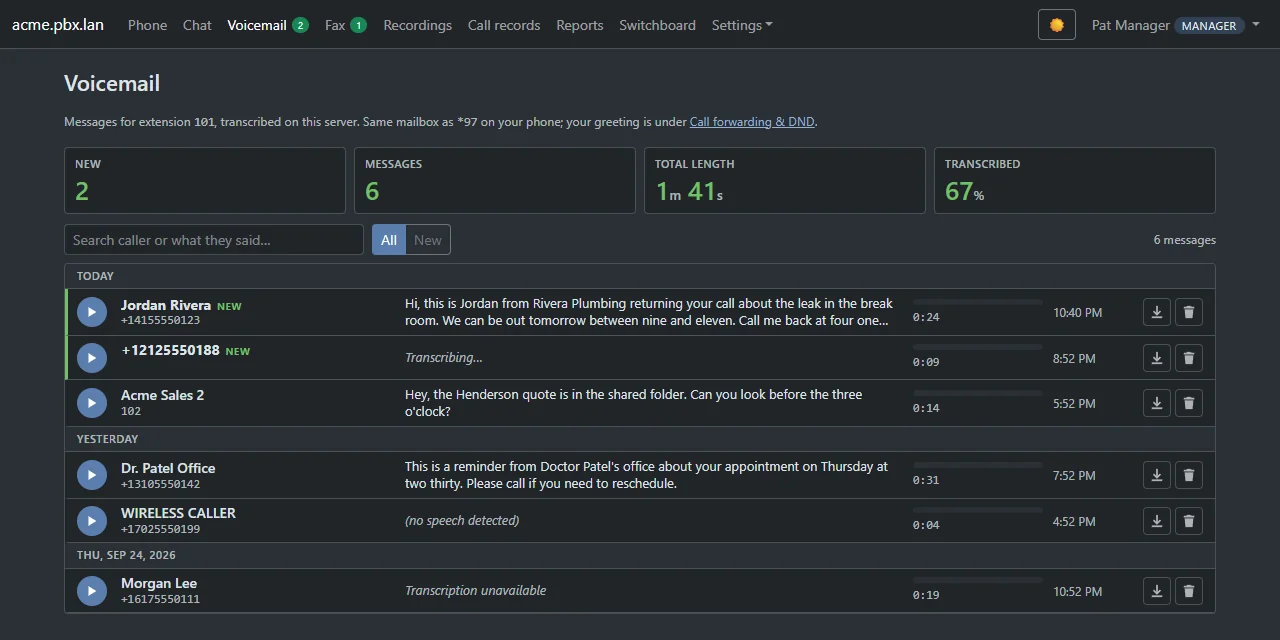
Messages show their words right on the row, written on our own servers. Scan the list, search for a name or a phrase, and press play only when you need the voice. Play or delete in the portal and the lamp on your desk phone follows.
yourcompany.projectpbx.net
Real screen
Every message shows its words. New ones are marked in green.
Voicemail to email
The caller, the time in your zone, the length, the words and the audio, in your inbox.
Voicemail by text
The caller and the first words of the message arrive as a text, the moment it is transcribed.
Shared boxes
A team mailbox with its own number and PIN, and a note of who has heard each message.
Greetings in your voice
Record one in the browser or the app, upload a file, or type it and let your company voice speak it.
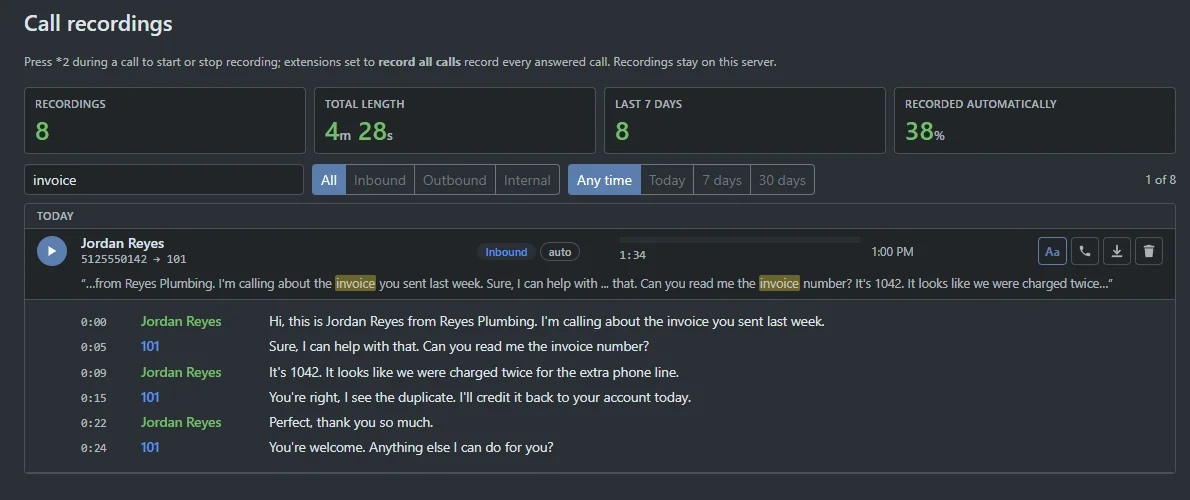
Calls you record are written out on our own servers, each side kept apart so you see who said what. Type a word and every mention lights up. Click a line to play from there.
Billing call · Jordan Reyes and ext 101Add-onLive demo
A transcript of a 70-second billing call between the caller Jordan Reyes and extension 101. A search box filters the transcript as you type and highlights every match. Phrases in quotes, a trailing star for any ending, and a minus sign to leave a word out all work. Previous and next buttons step through the matches, a switch shows only matching lines, and clicking a line plays from there.
Try
Matches only
/ 1:10Caller above the line, agent below, ticks mark matches
Jordan ReyesHi, this is Jordan Reyes from Reyes Plumbing. I'm calling about the invoice you sent last week.
Ext 101Sure, I can help with that. Can you read me the invoice number?
Jordan ReyesIt's 1042. It looks like we were charged twice for the extra phone line.
Ext 101You're right, I see the duplicate. I'll credit it back to your account today.
Jordan ReyesPerfect, thank you so much.
Ext 101You're welcome. Anything else I can do for you?
Jordan ReyesOne more thing. If this happens again I'll have to cancel the service and ask for a refund of the last two months.
Ext 101Understood. I've flagged the account so billing reviews it before every invoice goes out.
Jordan ReyesGood. Also, can you send the corrected invoice to our accounts address?
Ext 101Yes, I'll email the corrected invoice within the hour. The refund for the duplicate charge will show on your next statement.
Jordan ReyesGreat. Honestly, I was ready to speak to a lawyer about it, so I appreciate how quickly you fixed this.
Ext 101That's what we're here for. Have a good afternoon, Jordan.
Nothing in this call matches. Try or .
Phrases in quotes, a trailing star for any ending and a minus sign to leave a word out all work. Refund also finds refunds and refunded.
The same search, on the real page.
Press the Aa button on any recording to open its transcript. The matching recording shows its mentions highlighted in a snippet, and the open transcript lists every line with its time and who said it.
yourcompany.projectpbx.net
Real screen
Call recordings, searched for invoice.
Who said what
Each side of the call is kept apart, so every line says who spoke.
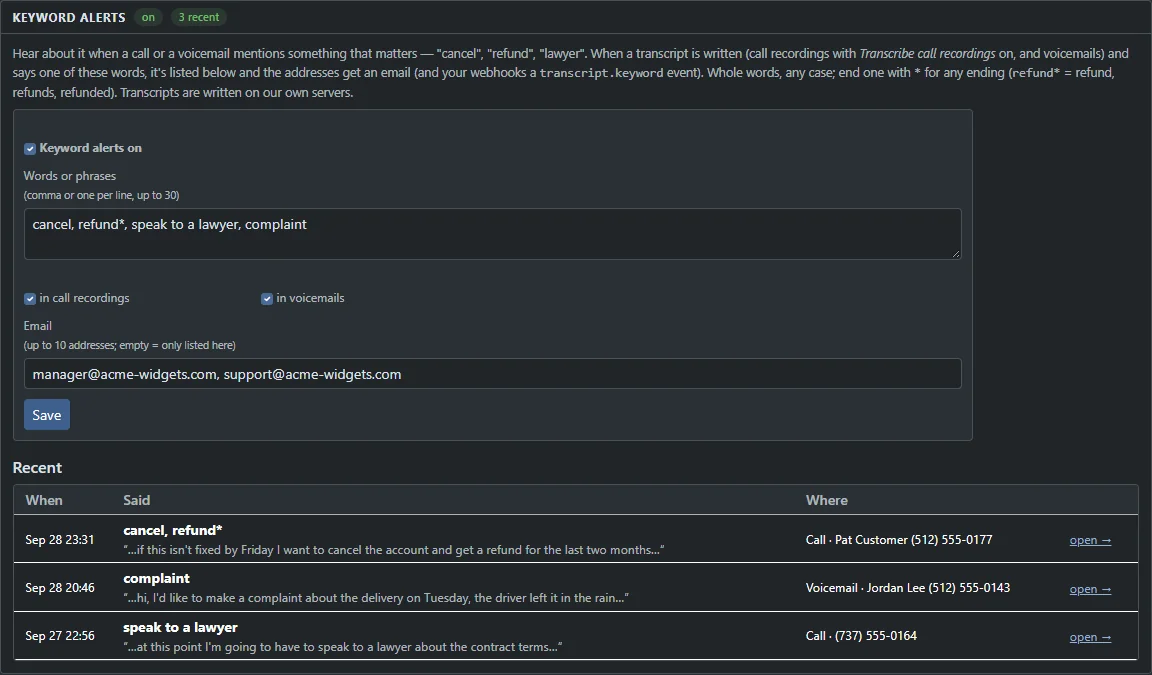
Give it up to 30 words or phrases. When a call or a voicemail mentions one, the people you choose get an email and your webhook gets an event. Matching happens on the voice server, so only the alert leaves it.
Watch list · edit itLive demo
A watch list of words and phrases is checked against six sample calls and voicemails. Edit the list and each item shows whether it would send an alert and which words matched. A trailing star matches any ending, so refund star matches refunded. Whole words, any case.
Comma or one per line, up to 30.
4 of 30 words watched
Try
Whole words, any case. Cancel finds cancel and CANCEL.
A trailing star matches any ending: refund* finds refunded.
Phrases work too. Add speak to a lawyer as one item.
4 of 6 would send an alert4 of 6 would send an alert
CallPat Customer(512) 555-0177 · Sep 28 23:31…if this isn't fixed by Friday I want to cancel the account and get a refund for the last two months…Alert sentcancel, refund*
VoicemailJordan Lee(512) 555-0143 · Sep 28 20:46…hi, I'd like to make a complaint about the delivery on Tuesday, the driver left it in the rain…Alert sentcomplaint
Call(737) 555-0164Sep 27 22:56…at this point I'm going to have to speak to a lawyer about the contract terms…Alert sentspeak to a lawyer
CallRiley Brooks(512) 555-0191 · Sep 28 16:12…I was refunded last week but the invoice still shows a balance…Alert sentrefund*
CallSam Okafor(737) 555-0112 · Sep 28 14:05…thanks for the quick fix, the new desk phone is working great…No match
VoicemailDr. Patel Office(310) 555-0142 · Sep 27 19:52…a reminder about your appointment on Thursday at two thirty, please call if you need to reschedule…No match
Whole words, any case. A trailing star matches any ending, so refund* matches refunded.
yourcompany.projectpbx.net
Real screen
The real settings page, with the recent hits.
Up to 30 words or phrases
Watched in call transcripts and in voicemail transcripts.
Email and webhook
Up to 10 email addresses get each alert, and a signed webhook event goes to your own systems.
Every hit opens the call
The Recent list shows the words that matched and links to the call.
30wordsWatched by a keyword alert, across call transcripts and voicemail transcripts.
90daysHow far ahead you can schedule a text, from one minute out. Cancel any time.
50pagesIn one fax, sent from the portal with an optional cover page.
2,000peopleReached by a single mass notification, by call, text or both. An add-on.
Everything in this area
Every line opens its feature.
Chat, voicemail, recording and texting features from the live catalog, each with a link to the full description. 247 features in all, across the whole product.
Tell us how your team talks to customers today. We show you chat, texting, fax, voicemail and call search running on a demo company, and answer anything you ask.