NEW The Android app now rings even when it's closed

Every call. Every channel.
One phone system.

Desk phones, a browser phone and an Android app ring together. Queues and a contact center, team chat, video, business texting and software fax live behind the same login, the same bill and the same support team. Change a call flow and it is live in seconds.

No server in your office Desk phones set themselves up Transcripts made on our own servers
yourcompany.projectpbx.net
Real screen
Live call-queue wallboard for Acme Corp: queues with callers waiting, longest wait, service level and which agents are free

One system. All of this behind one login.

1sCustomer details pop up on screen a second before the phone rings.
10sFrom saving a call flow or an extension to it being live. No restarts.
24hCalls keep connecting for a full day, even if our management platform goes offline.
247Features live in the product, and new releases ship every week.
The product

One system for every way you talk to customers.

Stop stitching together a phone vendor, a chat app, a texting tool and a fax line. ProjectPBX puts it all behind one login, with one bill and one support team.

A full phone on every screen.

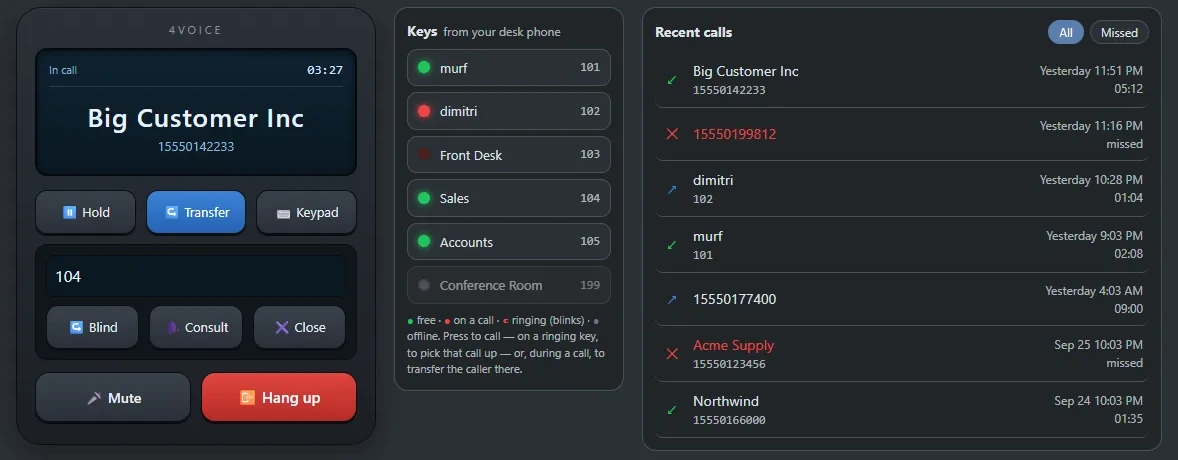
Make and take calls right in the browser while the desk phone still rings. Hold, blind or attended transfer, busy-lamp keys that mirror your desk phone, and recent calls. No install.

  • Desk phone, browser and Android app ring together. Answer wherever you are.
  • Busy lamps show who's free, ringing or on a call. Press one to pick up or transfer.
  • Forwarding, do-not-disturb, find-me and call pickup from the portal, the app or a star code.
  • Park, page, intercom and conference rooms with PINs and a moderator.
See calling
Real screenBrowser phone in a call with Big Customer Inc, transfer panel open, busy-lamp keys and recent calls beside it

A contact center, not a bolt-on.

Call queues with nine ring strategies, escalation levels, caller position announcements and a wallboard for the TV on the wall. Built into the same system as your phones.

  • Queue callback: callers press 1, hang up and keep their place in line.
  • Whisper: agents hear which line is calling before they're connected.
  • Wrap-up codes, surveys and per-agent reports with service level and abandon rate.
  • Supervisors monitor, whisper and barge into any live call.
See the contact center
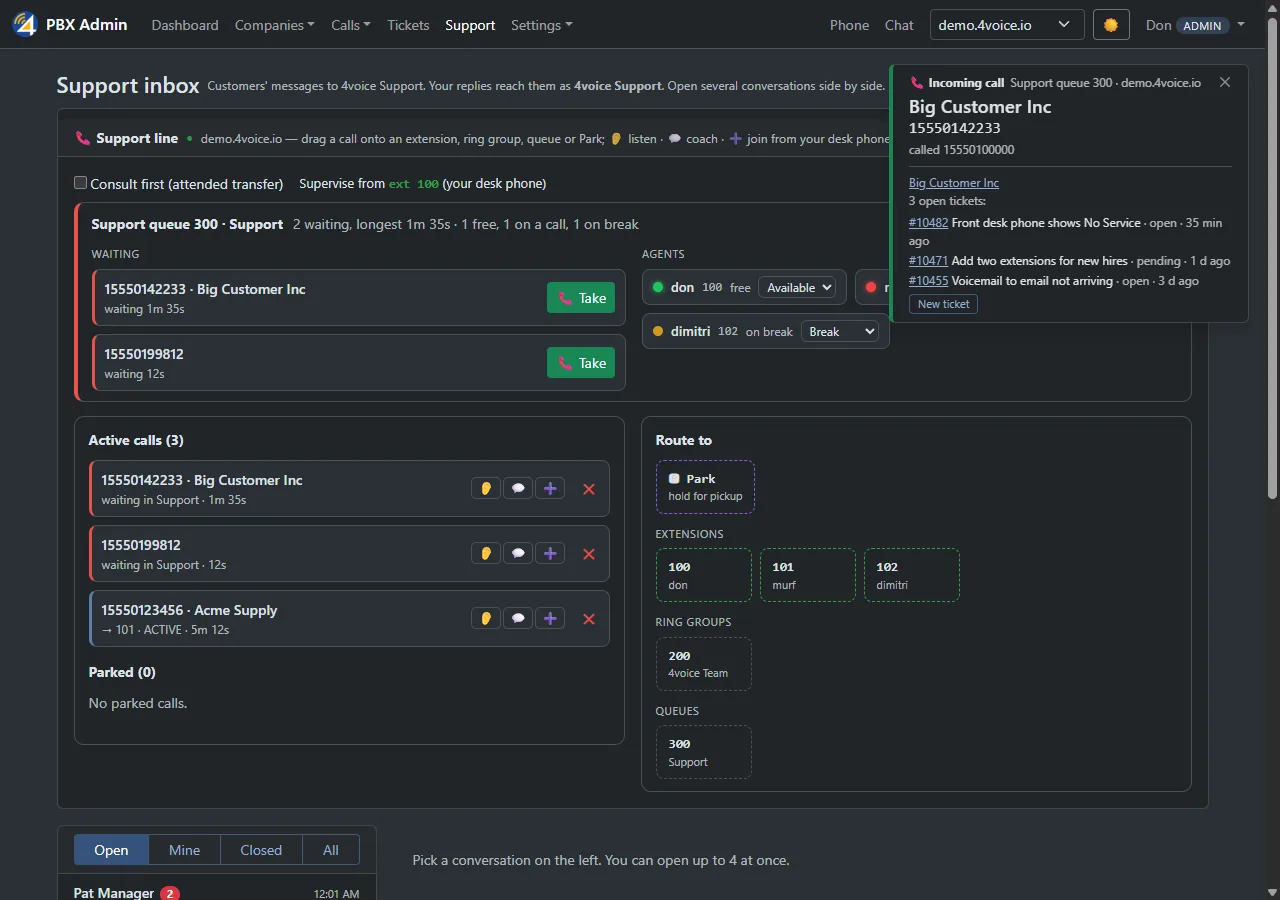
Real screenSupport console with callers waiting in the queue, agents and their status, and an incoming-call popup

Team chat that knows who's on the phone.

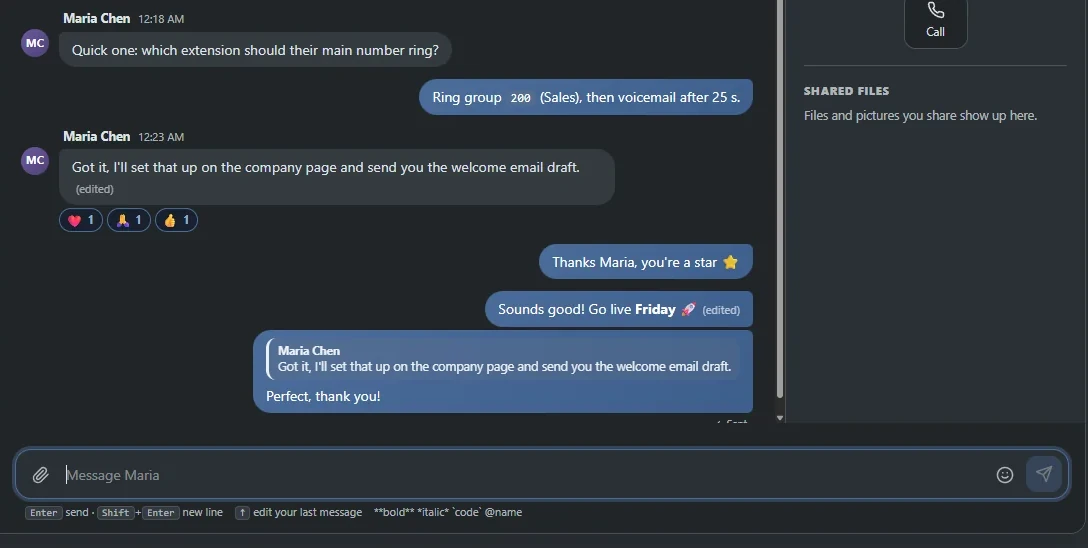
One-to-one messages and rooms, with a badge that shows who's on a call. Start a video call or share your screen in one click, no separate meeting app.

  • Reactions, replies, mentions, read receipts and file sharing.
  • Video calls and screen sharing for one-on-ones and whole rooms.
  • 4voice Support lives right inside your chat. Message us like a colleague.
  • Click a number in call records, voicemail or the phonebook to call it.
See collaboration
Real screenTeam chat thread with quoted replies, reactions and a message box

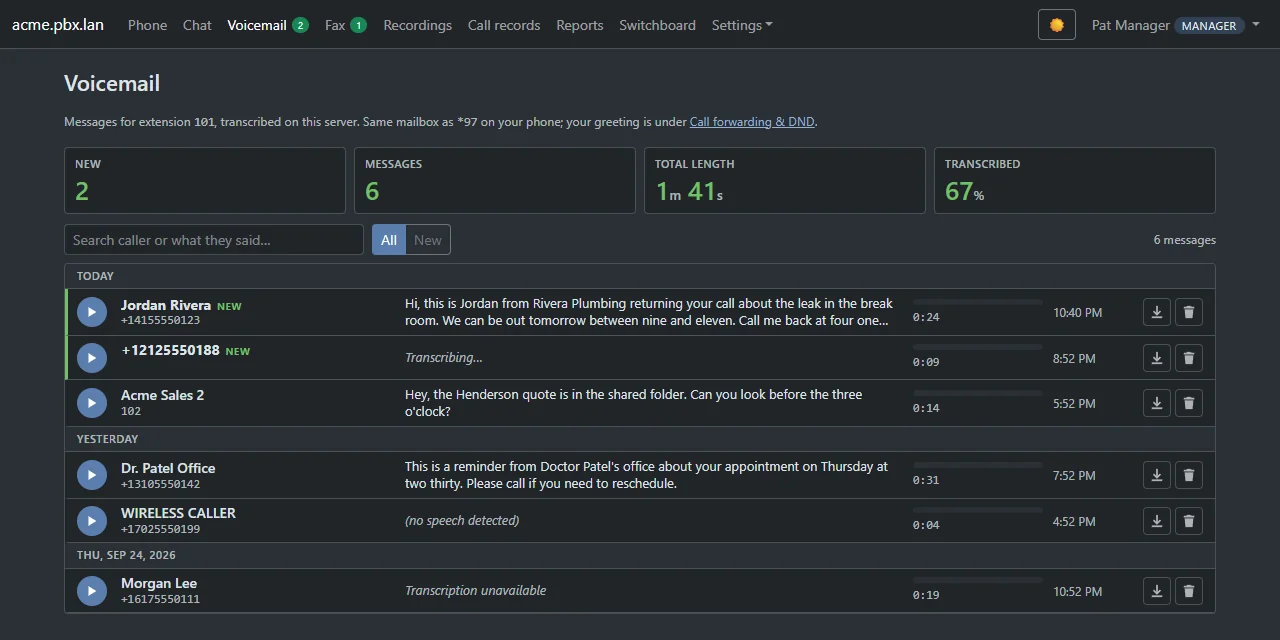
Read your voicemail. Search what was said.

Voicemails are transcribed by speech recognition running on our own servers, and recorded calls can be too. Your audio never goes to an outside AI service.

  • Search what callers said, not just who called.
  • Keyword alerts flag calls that mention “cancel”, “refund” or anything you choose.
  • Voicemail to email, shared team mailboxes and urgent-message alerts.
  • Recording consent, retention windows, legal hold and pause-for-card-details.
See voicemail and recording
Real screenVisual voicemail with a written transcript of each message

Text and fax from your business number.

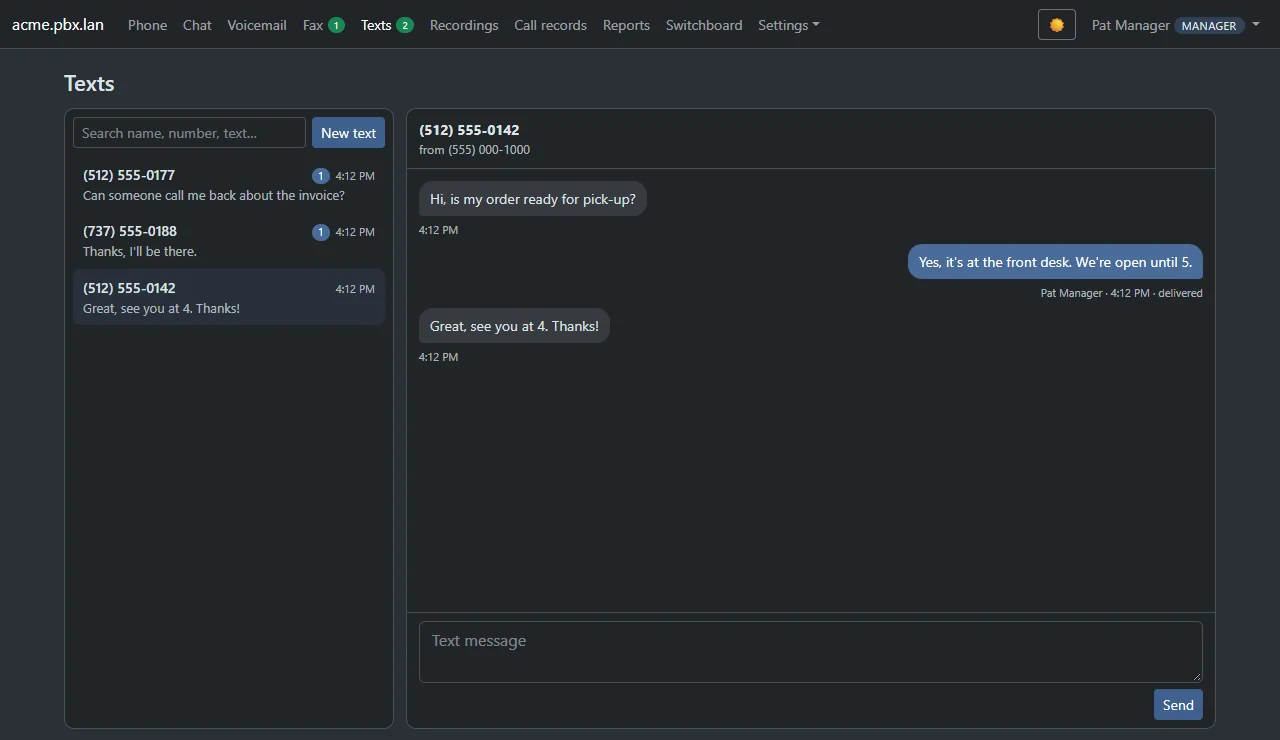
Customers can text the same number they call. Reply from the portal or the app, send pictures, schedule messages, and fax without a fax machine.

  • Missed-call text-back answers the caller you couldn't.
  • Picture messaging, send-later and saved replies.
  • Software fax with cover pages, sent and received in the browser.
  • WhatsApp and Messenger in the same shared inbox, as an add-on.
See texting and fax
Real screenBusiness texting inbox with a customer conversation

Know exactly what your phones are doing.

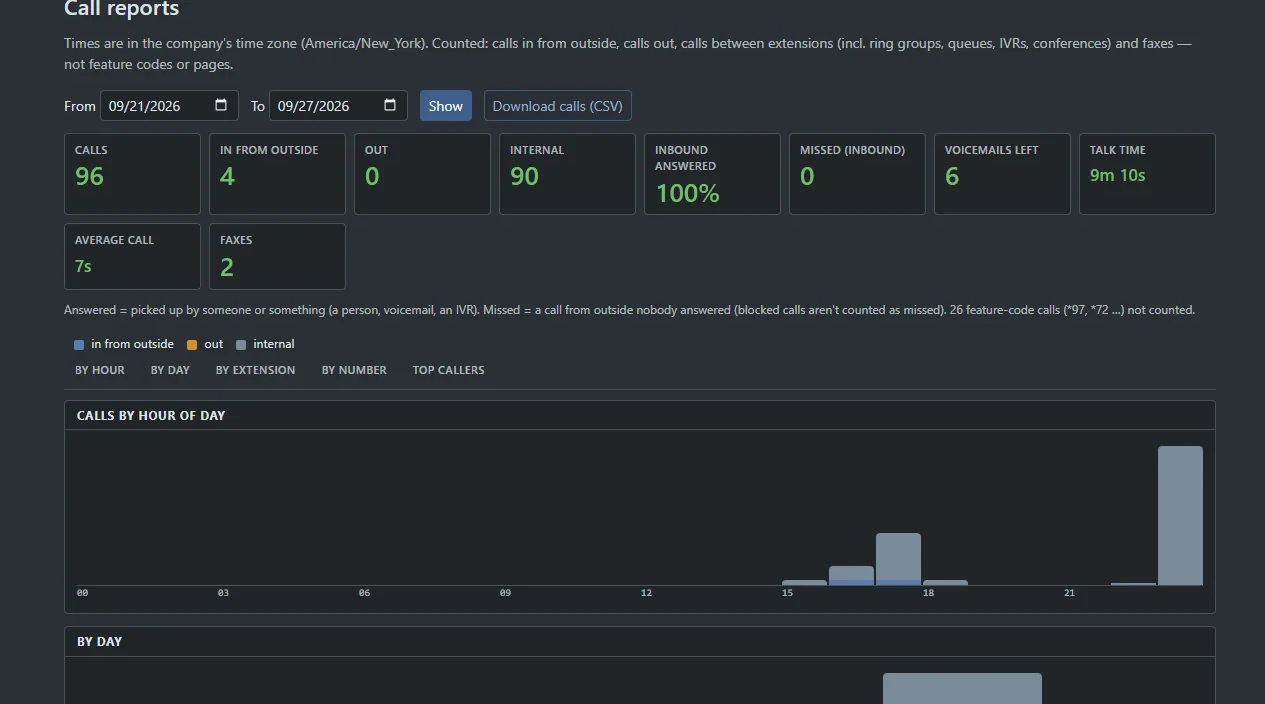
Reports by hour, day, extension and number in your own time zone, with CSV export and a scheduled email every morning. No spreadsheet gymnastics.

  • Missed calls, talk time, inbound answer rate and top callers.
  • Repeat callers and call-tracking numbers for your marketing, as add-ons.
  • Queue and agent reports with service-level targets.
  • Export everything: one ZIP of calls, recordings, voicemail, texts, faxes, chat and settings.
Search every feature
Real screenCall reports with totals, calls by hour and by day
The details that win customers

Small moments. Big difference.

Know who's calling before you say hello.

A screen pop lands a second before the phone rings: the caller's name, their number and the line they dialed, on extensions, ring groups and queues. Connect HubSpot or Salesforce and their CRM contact shows up too.

Caller nameLine dialedCRM contact, as an add-on
See the screen pop
Real screenSupport console with an incoming-call popup showing the caller and the line they dialed

See where every call goes.

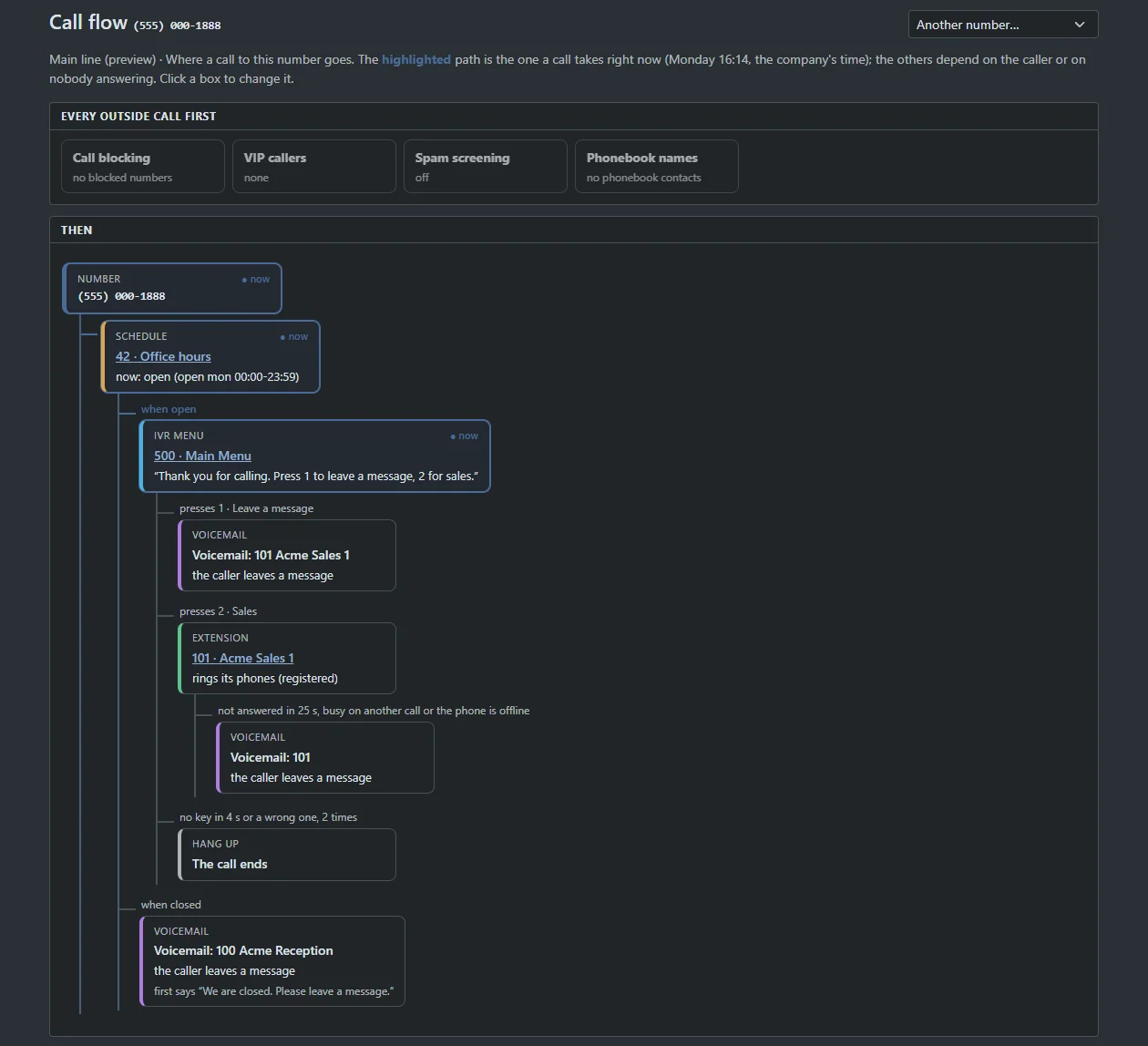
A map of each number: schedule, menu, who rings, where it falls back, with the path a call takes right now highlighted.

Real screenCall-flow map from a phone number through office hours, a menu and voicemail

Every word, searchable.

Find the call where a customer mentioned an invoice, in seconds.

Live demo
Jordan ReyesHi, I'm calling about the invoice you sent last week.
Ext 101Sure. Can you read me the invoice number?
Jordan ReyesIt's 1042. Looks like we were charged twice.
Ext 101I see the duplicate. I'll credit it back today.
On our serversSearchableKeyword alerts

Emergency calls, handled.

Every location keeps a dispatchable address and a callback number. The callback number goes out on every 911 call, and your people are alerted the moment someone dials.

Live demo
Emergency callExt 104 · Front Desk dialed 911123 Main St, Suite 200 · Floor 2

Hot desking.

Dial *55 on any shared desk phone, enter your extension and PIN, and it becomes yours. *56 hands it back.

Shared officesShift work

A call button on your website.

One script tag. Visitors type their number and your phones ring them straight back, within the hours you set.

Call-me widgetClick-to-call
Contact center

Every caller answered. Every agent in sync.

From a two-person front desk to a full support floor, queues scale with you, and your changes land without dropping a waiting caller.

Callbacks

Callers keep their place without waiting on hold. We call them back, first in line.

Nine ring strategies

Longest idle, round robin, least talk time and more, with a second tier when it's busy.

Live supervision

Monitor, whisper to the agent or barge in, from the switchboard.

Wallboards & service level

A TV wallboard, refreshed every 3 seconds, that turns amber and red when waits slip past your target.

Wrap-up & surveys

Tag every call with an outcome and ask callers how it went when they hang up.

Agents anywhere

Agents log in, log out and take breaks from the desk phone, the browser or the app.

See the contact center

Wallboard · try itLive demo
A seeded preview with the real color rules: green to target, amber to 3 times target, red beyond. Add a caller to a queue and watch it react.
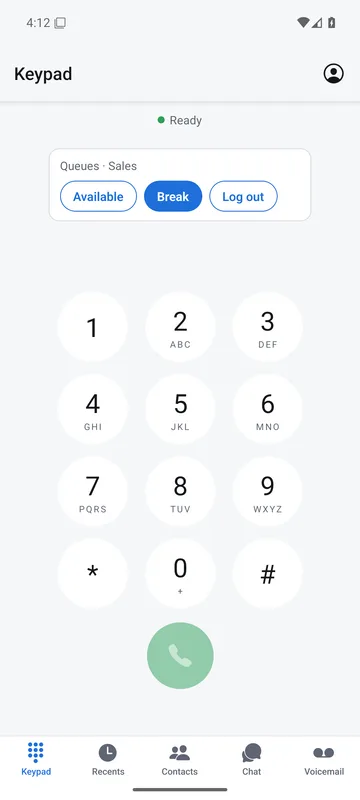
4voice app keypad with queue status
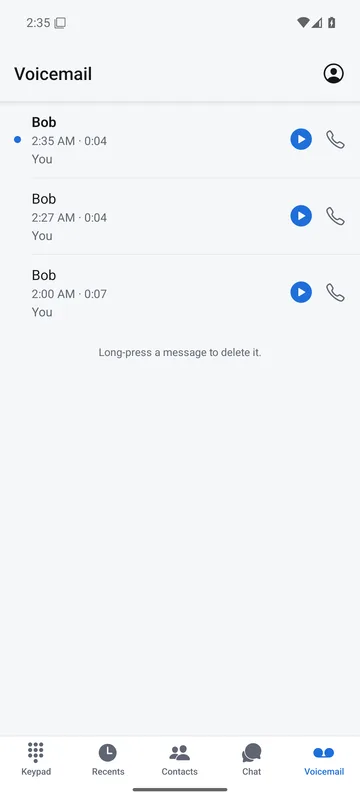
4voice app voicemail list
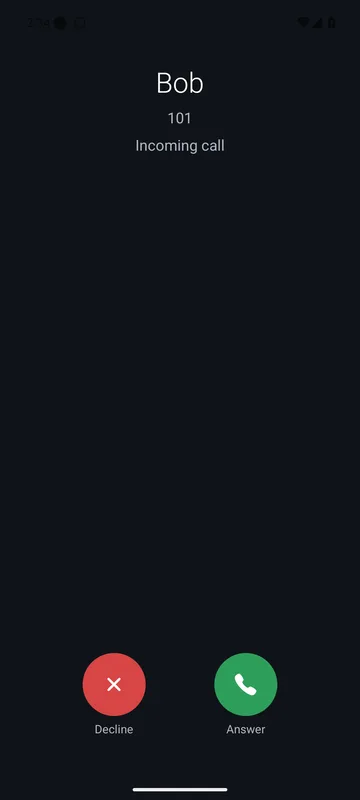
4voice app incoming call screen
Real screen
Mobile

Your office line, in your pocket.

The 4voice app turns an Android phone into your work extension. Make and take calls on your business line from anywhere.

Rings even when the app is closed

A push wakes the app and your phone rings with Answer and Decline. Tested on a real Android phone on cellular, 2026-10-01.

Move a call to your phone

Walking out of the office? Press *6 and the live call moves to your mobile. An add-on, switched on per company.

Chat, voicemail and queues

Team chat, visual voicemail, contacts with live status and queue log-in, everything from the desk, on the go.

See the mobile app

Built to stay up

Engineered for uptime. Calm on the surface.

ProjectPBX runs on proven open-source engines, FreeSWITCH, Kamailio and PostgreSQL, in a cluster with two front doors, a pool of voice servers and a hot-standby management platform.

Live demo How ProjectPBX is built Desk phones, browsers and the Android app connect through two front doors to a pool of voice servers. A management platform with a hot standby feeds every voice server its configuration. Desk phonesauto-provisioned Browserbrowser phone Android apppush-to-ring FRONT DOORS Front door Amedia relay · fraud guard Front door Bbackup for every company VOICE SERVERS Voice server 1calls · queues · media Voice server 2calls · queues · media Voice server 3calls · queues · media MANAGEMENT Management platformconfig · portal · apps · reports Hot standbylive replica · one command
  1. Your people
    Desk phonesauto-provisionedBrowser phonenothing to installAndroid apppush-to-ring
  2. Front doors
    Front door Amedia relay · fraud guardFront door Bbackup for every company
  3. Voice servers
    Voice server 1calls · queues · mediaVoice server 2calls · queues · mediaVoice server 3calls · queues · media
  4. Management
    Management platformconfig · portal · apps · reportsHot standbylive replica · one command
01

Health-aware routing

Front doors send each call to a healthy voice server. If one stops answering, new calls go to the next.

02

Keeps working through outages

Every front door and voice server remembers its last good configuration for 24 hours, so phones keep registering and calling even if management is down. Proven in a live test.

03

Hot-standby management platform

A live replica of the database stands by on a second server and takes over with one command. Practiced both ways in about 20 seconds.

04

Moves without dropping calls

Companies move between voice servers live: new calls go to the new server while calls in progress finish where they started.

05

Every call quality-scored

A monitor scores the audio quality of calls through the front doors and alerts 4voice when it slips.

See reliability

Security

Locked down, by default.

Phone systems are a favorite target for fraud. ProjectPBX stops it at the door, and gives managers the controls to see who changed what.

See security

Two-factor & single sign-on

Authenticator-app sign-in with 10 one-time recovery codes. Single sign-on and automatic user provisioning as an add-on.

Encrypted calls

Browser-phone audio is encrypted with DTLS-SRTP, desk-phone TLS and SRTP is available per company, and portals redirect to HTTPS.

Toll-fraud guard

International calling starts switched off, every company has call limits and a calls-per-minute cap, and fraud guard checks for odd patterns every 5 minutes.

Intrusion prevention

Scanners and password-guessers are banned across every front door at once.

Roles & permissions

Managers run the company. Users see only their own voicemail, recordings and call records.

Audit & change history

An audit trail of who changed what, plus configuration history with rollback as an add-on.

Transcribed on our servers

Speech recognition and voices run on our own servers. Audio, recordings and voicemail never go to an outside AI service.

Set how long recordings and voicemail are kept, place holds, export everything or request erasure.

Works with what you have

Give a phone its address. It sets itself up.

Phones provision themselves from a secret per-phone address: your extension, busy-lamp keys and clock, and on Yealink your logo as the wallpaper. Then connect the tools your team already uses.

See integrations
Yealinkauto-provisioned, wallpaper
Polycomauto-provisioned, BLF keys
Grandstreamaccount-level provisioning
Any browserbrowser phone
Android apppush-to-ring
HubSpot & Salesforcescreen pop & call logging
Slack & Google Chatmissed-call & voicemail alerts
WhatsApp & Messengerone shared inbox
REST API& signed webhooks
CalendarsGoogle & Outlook status
Contacts syncGoogle & Microsoft 365
OpenID Connectsingle sign-on & SCIM
Everything in the product

247 features. Go ahead, search.

Every feature below is live in ProjectPBX today. Search for what your phones need, and open the real screen for any of them.

0 of 247 features
Nothing matched. Ask us, it may already be there under another name.
Plans

Start from the closest fit. Then make it yours.

Pick the starting point that looks most like your business, then change anything. Seats or air time, the add-ons you switch on and your usage are itemized on one invoice.

Business phones

For offices that want a modern phone system without the headaches.

Your seatsQuote built around them.
  • Desk, browser & Android calling
  • Auto-attendant, ring groups & schedules
  • Voicemail with written transcripts
  • Team chat, video & screen share
  • Business texting & software fax
  • Call recording & reports
Build your plan

Partners & resellers

For managed-service providers and resellers who run phones for their clients.

Your clientsQuote built around them.
  • Your own portal address and branding
  • A company for each client
  • A pool of numbers to hand out
  • Monthly usage per client
  • Open a client's portal to help, audited
  • Single sign-on & user provisioning
Build your plan

These three are starting points for a quote, not fixed tiers · Bring your own phones or ask us · Keep your numbers, we help you port them

Questions

Good questions. Straight answers.

Can I keep my existing phone numbers?
Yes. Open Bring numbers over in your portal and list up to 100 numbers per request, your current carrier and where each number should ring once it arrives. Sign the letter of authorization by typing your name and we generate the PDF. Your request moves through submitted, in review, port date set and completed, with an email at every step, and your carrier confirms the date.
Which desk phones work with ProjectPBX?
Yealink, Polycom and Grandstream desk phones auto-provision from a secret per-phone address, with busy-lamp and speed-dial keys laid out for each Yealink model. Reprovision or reboot every phone in your company in one click. Prefer no hardware? Make and take calls in a modern browser, or use the Android app, which rings even when it is closed.
Do we need a server or any equipment in our office?
No. ProjectPBX runs in 4voice's cluster. You need an internet connection and your phones, browsers or Android apps. A network test, available as an add-on, checks your office connection for voice in about 20 seconds before you switch.
What happens if something goes down?
Calls are spread across several voice servers behind two front doors, and new calls move away from an unhealthy server. Every front door and voice server keeps its last good configuration for 24 hours, so phones keep connecting even if the management platform is offline, and a hot standby takes over with one command. An add-on lets you set failover routing so calls ring a mobile or another number if your office loses internet.
Is our call audio private?
Voicemail transcription, speech menus and voices run on our own servers. Audio, recordings, voicemail and chat text never go to an outside AI service. Recordings follow the retention window you choose, with a consent announcement, legal hold and erasure requests available.
How does 911 work?
Each location keeps a dispatchable address and a callback number. Every 911 call sends that callback number, and the people you choose are alerted the moment anyone dials. Emergency calls are never held back by call limits or fraud controls. Ask us on your demo how emergency calling works for your locations.
Can we resell ProjectPBX to our own customers?
Yes. Partner accounts get their own portal address, a company limit, their own logins and a pool of numbers. Create companies, add extensions and manager logins, hand out numbers and see each month's usage. Open any company's portal as its manager to help, with a banner and an audit trail, and brand your portal with your name, accent color and logo. 4voice handles the billing.
How long does it take to switch?
We create your company, from a saved template if you like, with extensions, ring groups, queues, menus, schedules and your time zone in one step. Your portal appears at your-company.projectpbx.net, each person gets a welcome email with a link to set their own password, phones auto-provision and numbers port in. Tell us your timeline on the demo and we plan it with you.

See it live

Hear the difference in a live demo.

We walk you through ProjectPBX running, call it, text it, watch the wallboard light up, and map out what your switch would look like.

  • A call flow drafted for your business
  • Pricing built around your team size
  • Every question answered on the call

Your business name goes with you to the next step. Your email stays in this browser until you send the form.