BUILD Dial it in and watch your plan take shape

Your plan, built around your business.

Start from the closest fit, then change anything: people, areas, add-ons, phones and numbers to port. Send it to us and the quote is built on exactly that.

One invoice, itemized Add-ons switched on per company Keep your numbers
How we put your plan together

Three starting points. One plan that is yours.

Pick the one that looks most like your business, then change anything. Seats or air time, the add-ons you switch on and your usage are itemized on one invoice.

Business phones

For offices that want a modern phone system without the headaches.

Your seatsQuote built around them.
  • Desk, browser & Android calling
  • Auto-attendant, ring groups & schedules
  • Voicemail with written transcripts
  • Team chat, video & screen share
  • Business texting & software fax
  • Call recording & reports
Start from this

Partners & resellers

For managed-service providers and resellers who run phones for their clients.

Your clientsQuote built around them.
  • Your own portal address and branding
  • A company for each client
  • A pool of numbers to hand out
  • Monthly usage per client
  • Open a client's portal to help, audited
  • Single sign-on & user provisioning
Start from this

These three are starting points for a quote, not fixed tiers · Bring your own phones or ask us · Keep your numbers, we help you port them

Plan builder

Build it. See it. Send it.

Move the dials and watch your plan write itself on the right. When it looks like your business, send it to us and the demo form opens already filled in.

Tell us your plan on a demo.

Team size, areas, add-ons, phones and numbers to port: bring them and we build the quote with you.

Book a demo
Plan builderLive demo
Skip to your plan

Start from the closest fit

Each one sets the dials for you. Change anything.

Everyone who needs an extension, a login or both.

25people

Which areas?

Tick what you want live on day one.

Calling and team chatExtensions, menus, schedules, voicemail, the browser phone, chat and video.Always in

Pick your add-ons

A first pick from the more than 100 add-ons. We switch them on for your company. Browse them all.

Calling1 picked
Routing and contact center1 picked
Voicemail and recording0 picked
Chat and meetings0 picked
Security and control0 picked
Reports and integrations0 picked

Phones and numbers

Yealink, Polycom and Grandstream desk phones auto-provision. The browser phone and the Android app need no hardware.

One request carries up to 100 numbers.
Your plan stays on this device until you change it. Every feature
From plan to phones

Four steps, one conversation.

You describe the shape. We show it running, price it with you and set it up.

  1. 01

    You shape it

    People, areas, add-ons, phones and numbers to port. The builder above turns them into a plan and hands it to us.

  2. 02

    We show it running

    We open a demo company and run your call flow through it: the schedule, the menu, the queue, the phone that rings.

  3. 03

    You get a quote that fits

    Seats or air time, the add-ons you switch on and your usage, itemized on one invoice. Ask us anything about it live.

  4. 04

    We set you up

    Your company is created in one step, your portal appears at your-company.projectpbx.net, phones auto-provision and numbers port in.

Standard on every plan

Everything that runs your phones is already in.

Phones, menus, queues, voicemail, chat and the controls to run them are standard. Add-ons sit on top, only where you want them.

9Ways to ring a queue, with escalation levels
10sEdit a route and every phone follows
6Natural English voices speak your menus, on our own servers
100+Add-ons to choose from, switched on per company

Add-ons go on top, one switch at a time.

Call transcripts, an outbound dialer, single sign-on, call scripts and more. Tell us which ones you want and we switch them on for your company. Once an add-on is on, your portal shows it in the menus and pages that use it.

Browse every add-on
Around the phones

Numbers, billing and partners, taken care of.

Port and order numbers, route across carriers, bill per seat or by air time, and run it all for your own clients.

Reseller accountsPartners get their own branded portal to create companies, add people, hand out pool numbers and see monthly usage.
Company templatesCreate a new company from a saved template of extensions, menus, queues and schedules in one step.
Bulk changesChange add-ons, prompt voice, call caps and retention for many companies at once, with preview and undo.
Getting-started wizardA six-step checklist built from your real settings, with one-step add-a-person and a welcome email.Add-on
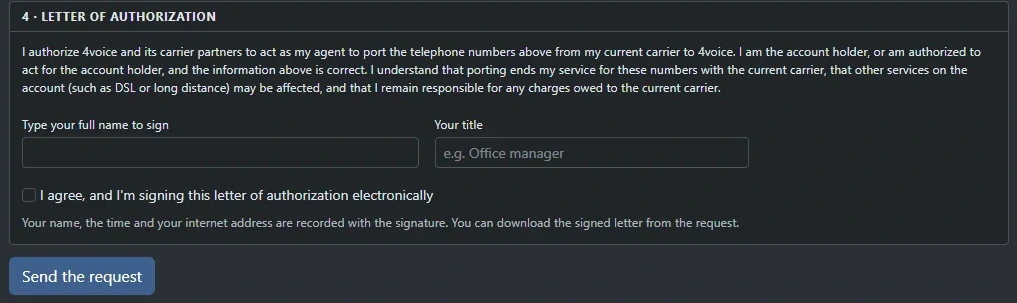
Number portingRequest up to 100 numbers per port, sign the letter of authorization by typing your name, and follow every step online.
Number orderingSearch local or toll-free numbers by area code, city or state and order up to ten at once.
Least-cost routingEach outside call goes out on the cheapest carrier for its prefix, with the others as failover.
Carrier failoverIf a carrier is down or refuses a call, the next one takes it.
Bring your own carrierAdd your own SIP trunk after 4voice approves it; it goes first and your 4voice trunk stays as backup.Add-on
Seat and usage plansBill per seat or by air time, with scheduled monthly invoices delivered by email.
Per-minute rate decksRate outbound calls by destination with included minutes and rounding rules, itemized on the invoice.
Online invoices and paymentsView invoices in the portal and pay by card through Stripe's secure checkout from a link in the email.
Taxes and fees on invoicesFederal, state and local rates, as a percentage, per seat or flat, added as their own invoice lines.
Uptime reportsA printable monthly uptime and answer-rate report per company, built from the status page and call records.
Your logo in the portalEach company gets its own logo and browser icon, and resellers can brand their whole portal.

See every feature

Moving in, moving out

Bring your numbers. Take your data.

Both are self-service in your portal, with every step visible and an email when it matters.

Moving in

Bring your numbers. Up to 100 per request.

List the numbers, your current carrier and where each should ring once it arrives. Sign the letter of authorization by typing your name, and we generate the PDF. Follow every step in your portal and by email.

Porting questions

  1. 01

    Submitted

    Email sent

  2. 02

    In review

    Email sent

  3. 03

    Port date set

    Shown the moment it is set

  4. 04

    Completed

    Account PIN wiped

yourcompany.projectpbx.net
Real screen
The signing step of a porting request: type your full name to sign the letter of authorization, add your title, tick to agree, and press Send the request.
Bring numbers over, in your portal. Click the screen to open it full size.
Moving out

One download. Everything you hold.

Calls, recordings and voicemail with transcripts, texts and pictures, faxes, chat and your whole set-up land in a single ZIP, with passwords and keys left out. A manager asks, we email you when it is ready, and you download it signed in.

Data questions

  • Up to three exports a day
  • Each export stays ready for seven days
  • Call reports download as CSV
  • Passwords and keys left out
yourcompany.projectpbx.net
Real screen
The Data export panel: a Build an export button and a ready export with its date, status, size and a Download button.
Settings, Data export, in your portal. Click the screen to open it full size.
Questions

Good questions. Straight answers.

Pricing, porting, phones, onboarding, 911, texting, your data and partner accounts. Anything else, ask it on a demo.

How does pricing work?
Your quote is built from the plan you put together here: seats or air time, the add-ons you switch on and your usage, all itemized on one invoice. Send us your plan from the builder and we price it with you on your demo.
How do add-ons work?
More than 100 add-ons sit on top of the standard system: call transcripts, an outbound dialer, single sign-on, call scripts and more. Tell us which ones you want and we switch them on for your company. Once an add-on is on, your portal shows it in the menus and pages that use it.
How do I bring my existing numbers?
Open Bring numbers over in your portal. List up to 100 numbers per request, your current carrier and account details, and where each number should ring once it arrives. Sign the letter of authorization by typing your name and we generate the PDF. Your request moves through submitted, in review, port date set and completed, with an email at every step. Your carrier confirms the port date and the request shows it the moment it is set, and your account PIN is wiped when the port is done.
Which phones will work?
Yealink, Polycom and Grandstream desk phones auto-provision from a secret per-phone address, with busy-lamp and speed-dial keys laid out for each Yealink model. Reprovision or reboot every phone in your company in one click and see which ones did not answer. Prefer no hardware? Make and take calls in a modern browser, or use the Android app, which rings even when it is closed. Tell us the phones you have or plan to buy and we will go through them on your demo.
How does onboarding work?
We create your company, from a saved template if you like, with extensions, ring groups, queues, menus, schedules, shared mailboxes, add-ons and your time zone in one step. Your portal appears at your-company.projectpbx.net and each person gets a welcome email with a link to set their own password. Phones auto-provision, numbers port in, and we provide the Android app. We register your numbers for business texting during onboarding too.
How does business texting get set up?
Business texting runs on your company's own North American numbers, with picture messages, missed-call text-back, reply templates and scheduled texts. We register your numbers for business texting during onboarding. You switch texting on per number and choose whose inbox it lands in. STOP and UNSUBSCRIBE are honoured automatically until the person sends START.
What about 911?
Each location keeps a dispatchable address and a callback number. Every 911 call sends that callback number, and your staff are alerted the moment anyone dials 911. Emergency calls are never held back by call limits or fraud controls. Ask us on your demo how emergency calling works for your locations.
Can I take my data with me?
Yes. A manager builds a company export in the portal: one ZIP with call records, recordings, voicemail and transcripts, texts and pictures, faxes, chat and your whole set-up, with passwords and keys left out. You get an email when it is ready and download it signed in. Build up to three a day; each stays ready for seven days. Call reports download as CSV, and an add-on sends call records to your own S3-compatible storage or SFTP server on a schedule.
Can I run ProjectPBX as a reseller?
Yes. Partner accounts get their own portal address, a company limit, their own logins and a pool of numbers. Create companies, add extensions and manager logins, hand out numbers from your pool and see each month's usage in calls, minutes and texts. Open any company's portal as its manager to help, with a banner and an audit trail, and brand your portal with your name, accent color and logo. 4voice handles the billing.
Can I change my plan later?
Yes. Add-ons are switches, not new systems: ask us and we switch one on or off for your company. Extensions, queues, menus and numbers are yours to change in the portal, and every edit reaches your phones in about ten seconds.
Can I see it running first?
Yes. Book a demo and we open a demo company, run your call flow through it and answer your questions live.
See it live

Book a demo. Bring your plan.

Bring your team size, your numbers and your questions. We will run your call flow on a demo company and price your plan with you, live.

  • A call flow drafted for your business
  • Pricing built around your team size
  • Every question answered on the call

Your business name goes with you to the next step. Your email stays in this browser until you send the form.